Bolt EtherCAT Communication — Traditional vs Flair Bridge
Bolt rigs communicate with the Flair PC via EtherCAT — a real-time industrial Ethernet protocol. There are two ways to establish this connection:
- Traditional method — an EtherCAT PCIe card installed in the Flair PC (Windows only), running the INtime real-time OS extension.
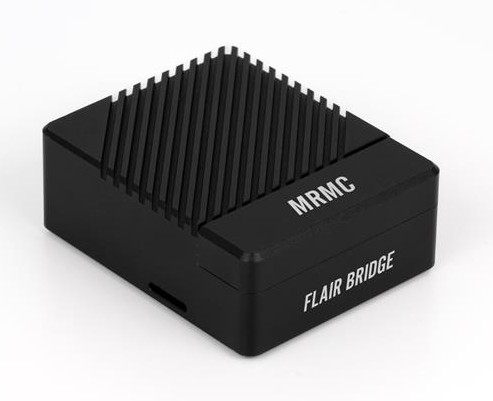
- Flair Bridge — MRMC's external hardware device that handles the EtherCAT connection, allowing any PC, Mac, or Linux machine to control the Bolt over standard Ethernet (Flair 7 only).
Method 1: Traditional EtherCAT Card (Windows / Flair Classic or Flair 7)
This method requires a compatible EtherCAT PCIe card installed in the Flair PC, the MRMC Bolt Setup Files, and a licensed INtime installation. It is the only option for Flair Classic.
What you need
- A Dell or compatible PC with a free PCIe slot
- A CIFX-series EtherCAT PCIe card (Hilscher)
- The Bolt Setup Files Folder — supplied by MRMC; contains EtherCAT drivers and Bolt-specific configuration
- INtime real-time OS (TenAsys) — hardware dongle license required
- Flair Classic or Flair 7
Bolt Setup Files Folder
The Bolt Setup Files Folder is not publicly available for download. It must be obtained from MRMC. MRMC entered liquidation in May 2026 — contact the Flair Community WhatsApp group, as other operators may be able to share a copy.
Setup overview
Setting up a traditional EtherCAT connection requires working knowledge of Windows device drivers, INtime configuration, and BIOS settings. The steps below are a high-level guide — full details depend on your specific hardware.
- Install the EtherCAT card — power down the PC, install the CIFX card into a PCIe slot, secure it, connect the EtherCAT cable to the correct port on the card.
- Verify hardware detection — boot the PC and confirm the card appears in Windows Device Manager without errors.
- Install INtime — run the INtime installer, configure licensing (hardware dongle required), set up Node A.
- Deploy Bolt Setup Files — extract the Bolt Setup Files Folder to the required directory, install EtherCAT drivers from the setup folder, configure network settings as per the folder's instructions.
- Install and configure Flair — point Flair at the EtherCAT connection.
Troubleshooting
| Symptom | Likely cause | Fix |
|---|---|---|
| ERR light on EtherCAT card | Communication failure | Check cable, port selection, and INtime status |
| CS8 shows 'A' but Flair won't connect | STARC board seating | Reseat the STARC board in the CS8 |
| INtime Node errors | Node A not running | Restart Node A from the INtime monitor |
| No communication after cold boot | Boot order | Boot Bolt first, wait for 'A' on CS8, then cold boot PC |
Method 2: Flair Bridge (Flair 7 only)
The Flair Bridge is MRMC's purpose-built EtherCAT bridge device. It connects to the Bolt via EtherCAT on one side, and presents as a standard Ethernet device on the other. This eliminates the need for a PCIe EtherCAT card, INtime, BIOS configuration, and Windows-specific hardware.
Flair Bridge requires Flair 7. It does not work with Flair Classic.
Advantages
- Works on Mac, Windows, and Linux
- No EtherCAT card, no INtime, no BIOS tweaks
- Plug-and-play Ethernet connection from the Flair machine
- Portable — works with laptops
Setup
- Connect the Flair Bridge to the Bolt CS8 via EtherCAT cable (ETH 0 port on the Bridge is dedicated to EtherCAT).
- Connect the Flair PC/Mac to the Flair Bridge via standard Ethernet — use a managed switch if you need to connect other devices to the same network.
- Install Flair 7 on the PC/Mac.
- Configure the Flair 7 network settings to point at the Flair Bridge.
"I've had our Bolt running through the Flair Bridge and it worked pretty seamlessly! You need a managed switch to then plug the Flair computer into since the ETH 0 port has to be used for the EtherCAT connection." — Josh Ellis-Tufts
Pricing (at time of MRMC liquidation, May 2026)
- £499 for EtherCAT systems (Bolt)
- £449 for other rigs
DIY alternative (community-verified)
Colin Michael Quinn confirmed a working DIY Flair Bridge substitute using a Raspberry Pi CM5 with a Waveshare CM5-DUAL-ETH-MINI board. Requires Flair Bridge firmware for the MMC.
Which method to choose
| Traditional EtherCAT | Flair Bridge | |
|---|---|---|
| Flair Classic | ✅ Yes | ❌ No |
| Flair 7 | ✅ Yes | ✅ Yes |
| Mac / Linux | ❌ No | ✅ Yes |
| Laptop-friendly | ❌ No | ✅ Yes |
| INtime required | ✅ Yes | ❌ No |
| Additional hardware cost | EtherCAT card only | £449–£499 |