ISSUE — Track Axis Trips Mid-Move Due to Velocity Spike (Tripcode 3)
Summary
Track axis trips at a consistent point through the move (Tripcode 3), caused by a velocity spike or singularity in the move curve — often originating from a CGI/FBX import or curve generation glitch. Flair's velocity checker samples speed every few frames and can miss a brief spike peak between samples. Check the velocity graph for sudden discontinuities and delete or re-smooth the offending keyframes.
Symptoms
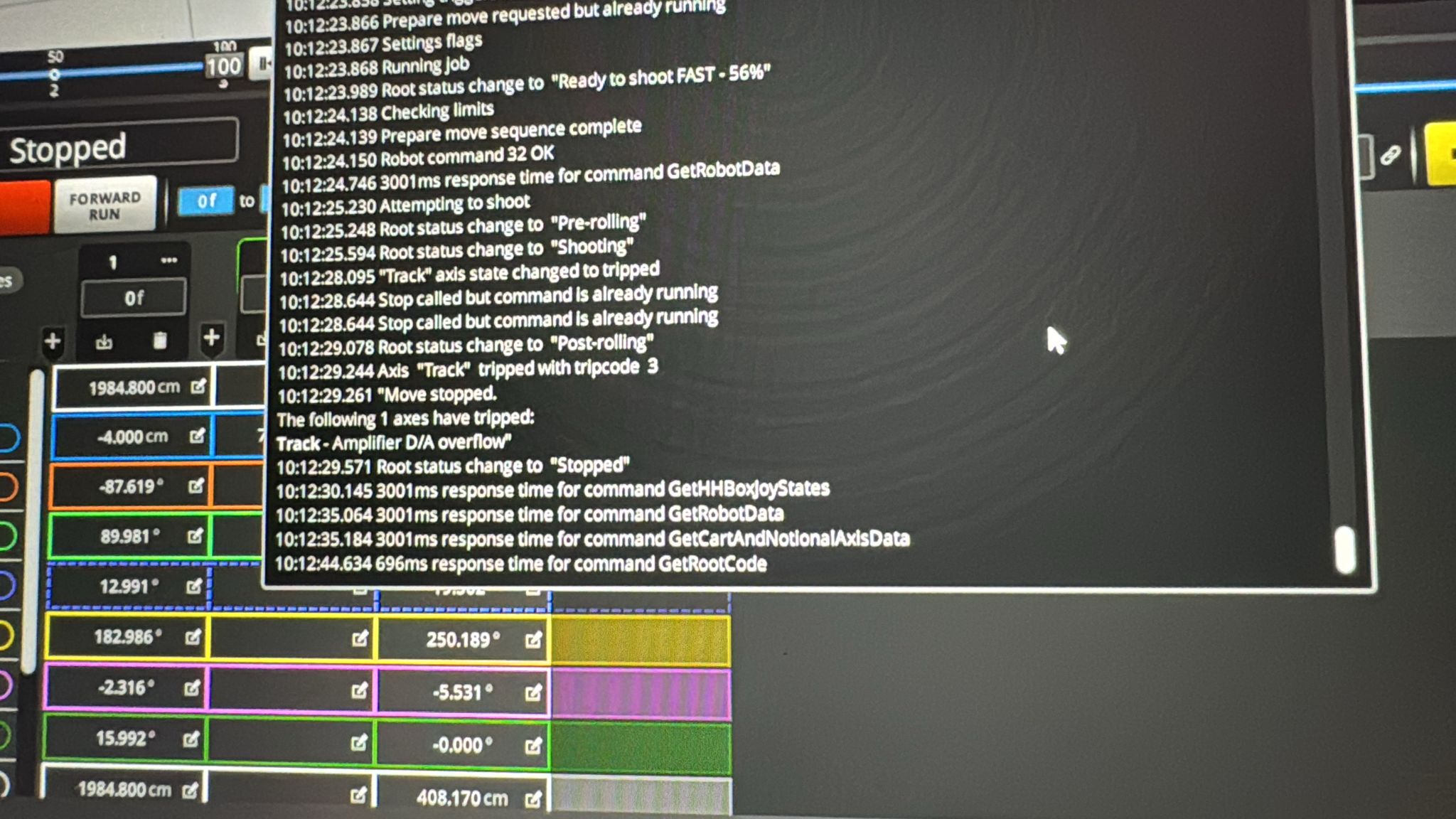
- Track axis trips at a specific percentage through the move (56% in reported case)
- Tripcode 3 in output log
- Occurs even on simple 2-point moves created in Flair
- Retightening rack joint and testing without joint crossing did not resolve it
- The trip occurs even when the rack joint is not in the equation
Systems Affected
- Cinebot Mini (Ben Myers — confirmed)
- Applicable to any rig, particularly with imported or complex moves
Software Environment
Possible Causes
- Velocity spike / singularity in the move curve
- Flair's velocity checker tests speed every couple of frames — a sudden spike can exceed the threshold even if the peak is between checks
- Singularity can originate from a CGI/FBX import or from a glitch in curve generation
Solutions
Solution A — Check the velocity graph for spikes
Contributor(s): ~ Simon Wakley — 2024-10-29
Steps
- Open the velocity/graph view for the track axis in the move editor.
- Look for a sudden spike or discontinuity in the velocity curve.
- If a spike is found:
- Delete the offending keyframe(s) near the spike.
- Re-smooth the curve and test.
- If the move was imported from CGI/FBX, re-examine the source data for singularities.
- Submit a bug report to MRMC with the import file if the spike appears to be from import.
Notes
"Check the graph. The velocity checking does a speed check every couple of frames and if you have a sudden spike, then it could miss the peak. If you have a sudden spike then there is a singularity or a glitch on the curves possibly from import. Send a bug report to MRMC with the import file as applicable." — Simon Wakley
Tripcode 3 in the output log confirms a velocity/control system fault, not a mechanical or sensor issue.
Solution B — Reduce granularity of the move
Contributor(s): ~ Heiko Matting, ~ Ante — 2024-10-27
Steps
- Open the move in the move editor / graphical edit view, then reduce the Granularity setting for the imported curve or move (e.g., from 1 to 2).
- Check if this smooths out the velocity spike.
- Be aware that reducing granularity may alter the shape of the move slightly.
Notes
"I did that also, but then I got something weird at the beginning so I found best was to use granularity 2 without those end frames." — Ante
Deleting the specific offending keyframes (if the bump is in a known location) is often cleaner than changing granularity globally.
Timeline
| Event | Date | Contributor |
|---|---|---|
| Reported | 2024-10-28 | Ben Myers |
| Velocity spike diagnosis | 2024-10-29 | ~ Simon Wakley |
| Granularity workaround noted | 2024-10-27 | ~ Heiko Matting, ~ Ante |
Official Documentation
| Document | Section | Notes |
|---|---|---|
| (No specific manual reference identified) | — | — |
Related Media
Media Text / Description
- Media 1: Flair display showing the track axis tripping around 56% through the move. Visible/searchable error text: Tripcode 3. The trip persisted after retightening the track joint and testing a move that did not cross the joint.
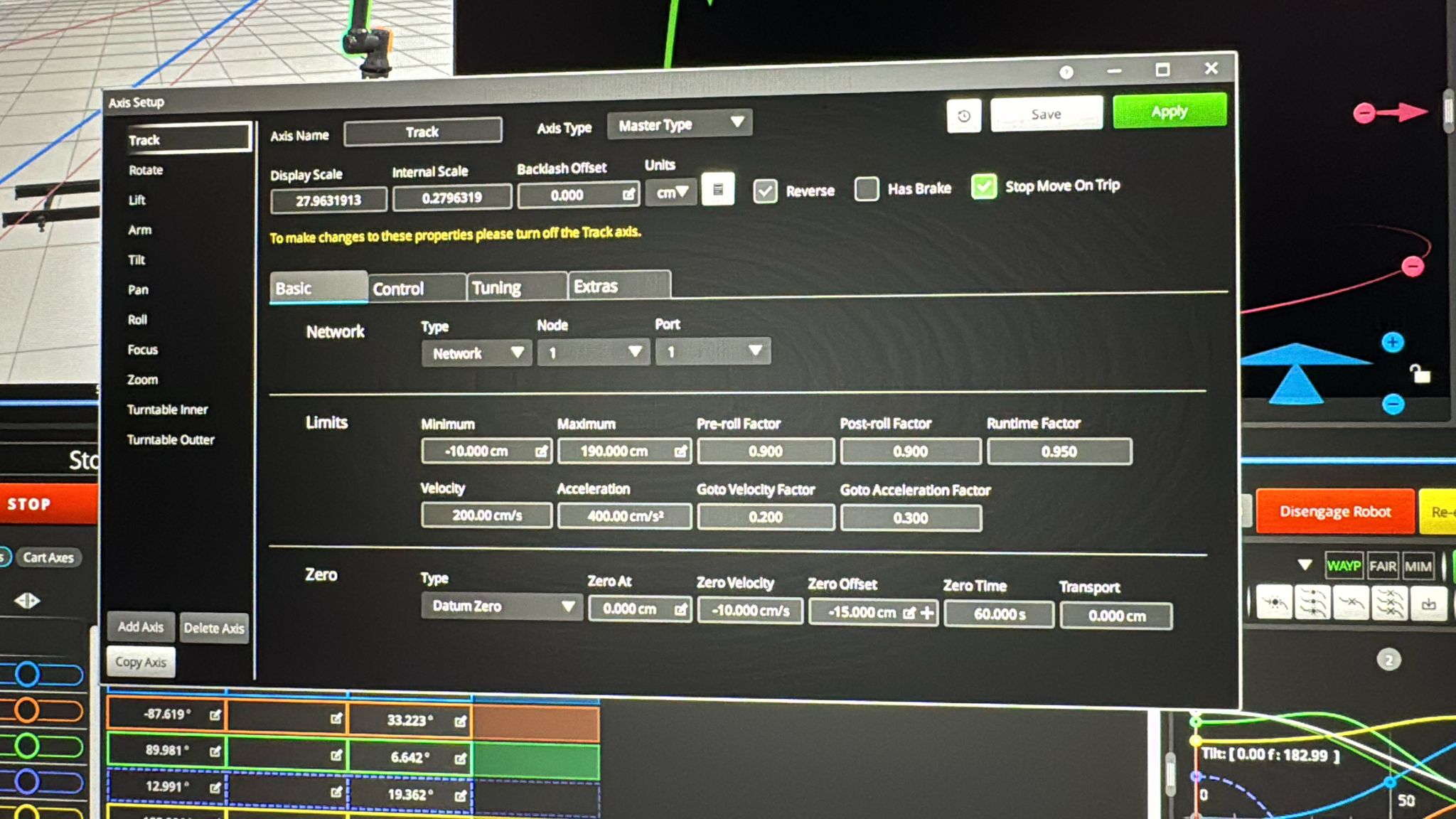
- Media 2: Follow-up screenshot of the same repeatable track-axis trip. Later diagnosis points to velocity spike, singularity, or curve glitch from import.
WhatsApp Excerpts
Additional Community Notes
[FORUM — talk.mrmoco.com] Root cause of velocity spikes from Maya imports explained by Simon Wakley:
Maya uses cubic interpolation to generate its curves, which produces smooth position data and continuous velocity — but there is a specific failure mode at zero crossings: the velocity hits zero as a straight (vertical) line in the graph, which creates a near-infinite acceleration discontinuity (spike) in the acceleration curve. This is the root cause of velocity-limit trips on axis-imported FBX or CGI moves.
What it looks like: position curve (blue) = smooth; velocity curve (green) = continuous but hits zero with a vertical slope; acceleration curve (red) = spike at that zero crossing.
Fix: Apply the Smooth function 3–4 levels to the imported move curves. The acceleration curve can have bumps, but not vertical discontinuities. This resolves the trip without requiring changes to the source Maya data.
Reducing move Granularity from 1 to 2 is a secondary workaround but may alter the shape of the move slightly.
"Maya uses Cubics to generate its curves (mostly) and these do NOT guarantee a smooth acceleration. Use the Smooth function 3-4 levels and you get a smooth result. The acceleration can have spikes, but not totally vertical discontinuities." — Simon Wakley, talk.mrmoco.com
Why Flair Trips Instead Of Just Running Slower — Explained in Tutorial
From tutorial video, added 2026-08-30
The tutorial "30 - The Runtime/Timeline display in Flair 7" explains, on a generic move, what a velocity-limit trip actually does and why it matters beyond just stopping the shot — directly relevant background for this Tripcode 3 scenario:
"If you set it too fast... it'll tell me where the problem lies... it's going too fast over velocity and is going over acceleration, accelerating too hard... generally speaking we don't recommend that you ignore it and run. Chances are that the robot won't be able to do that... the robot will 'trip' — it'll try and run it that fast and the motors will not be able to keep up, and the robot will then turn off and all the brakes will come on and it will stop with quite a sudden jolt... if the rails are on some very slippery floor they can slide or shift, and that means your passes will no longer match — your rig is no longer in the same place." — 30 - The Runtime/Timeline display in Flair 7
This confirms the general severity model behind Flair's speed/velocity checking (colour-coded warnings, worse the further over the limit) and explains the mechanism of a trip: it is a protective motor shutdown when commanded speed exceeds what the motors can physically deliver, not a software glitch. It supports Simon Wakley's diagnosis above that a velocity spike from CGI/FBX import curves is a real physical problem worth fixing at the source (via Smooth or reduced Granularity) rather than something to override — on a track system in particular, ignoring the warning risks the rail sliding on the floor and losing pass-to-pass repeatability, on top of the trip itself.
confidence_score: 0.55
Source: Importing from Maya Curves etc (2022-08-25, Simon Wakley)
Additional Background — Colour Coding and a Second Physical Risk (from a separate tutorial)
From a separate tutorial video, added 2026-08-30
The tutorial "12 - Limits of the rig during Moves & Browsing" adds two specific details that complement the general explanation above without repeating it:
- What the colour actually means: in the move/keyframe display, a frame that's flagged as exceeding a limit turns blue for an over-velocity condition, and a different colour (red) for an over-position condition — i.e. the colour tells you which limit type was breached, not just that something was breached. "Over" and "under" both mean too fast, just in opposite directions along that axis.
- A second, distinct physical risk on track: separately from rails sliding on a slippery floor (covered above), a fast lateral stop with a heavy camera payload on a short or lightly-weighted track section that isn't tied down to the ground can make the whole rail tip over, not just slide — this is a momentum/leverage risk, not a traction risk, and applies even on a floor with good grip.
Both points support the same practical rule already established above: heed Flair's overspeed warnings, but also always run a new or edited move at reduced speed first regardless of whether it warns you, and increase speed gradually once you've confirmed it's safe — a warning-free move can still be physically risky on an unsecured/lightweight track setup.
confidence_score: 0.55
Related Issues
- See also: Track Axis Trips 1–2 Seconds After Engagement
- See also: CGI Motion chapter
- See also: Track Issues chapter
- Pan / Tilt Bottleneck - Move Duration Or 800 Frame Error
- Carts Priority Hides Pan Flip - Use Axis Graphs and Flip Pan Axis
- Scaling Move Flips Camera Upside Down - Initialize Scaling
Related Tutorials
▶ 16:06 — Colour-coded speed/velocity/acceleration warnings and why ignoring them is not advisable ▶ 17:04 — What a trip actually does: sudden motor shutdown, brakes on, and the risk of rails sliding on the floor
▶ 03:54 — Move-graph colour coding: blue for over-velocity vs red for over-position ▶ 07:03 — Fast stop on a light/unsecured track section risking tip-over, separate from sliding
Revision History
| Date | Change | Editor |
|---|---|---|
| 2026-05-24 | Initial extraction | Tom D / Claude Code |
| 2026-05-24 | Reformatted to CSS-tag template | Tom D / Claude Code |