Cartesian Mimic with Pan Bars
[BOTH] The MRMC Mimic Handwheels can drive a Flair rig in Cartesian (carts) mode, giving the operator pan/tilt-style physical control of the camera path in world space — not just axis-by-axis movement. This is distinct from the simpler Axis Mimic mode and requires specific configuration steps.
In plain language, the handwheels can tell the camera where to point or move in the room, while Flair decides which robot motors must move to achieve it. Axis Mimic directly controls selected motors. Cartesian Mimic controls the camera or target position instead. A singularity is a robot position where Flair can no longer choose a stable joint solution; the robot may attempt a sudden large correction.
Experienced operators only
Cartesian Mimic disables the normal Cartesian control limits when configured for free movement. The rig can run into mechanical singularities without warning in this mode. Understand singularity points for your rig before using this feature live.
Hardware
MRMC manufactures dedicated Mimic hardware for this purpose:
- Handwheels — rotary wheel controls for pan and tilt.
- Pan bars — ergonomic pan bar handle set for camera operators familiar with fluid head operation.
- Focus controller — rotary focus knob connected to Flair to control the focus motor axis (used with Axis Mimic, not covered by this page).
Dan Gottesman: "MRMC also makes dedicated Mimic hardware controls, like hand wheels, pan bars, and focus controllers. They can all be used in this same way."
Contact MRMC (support@mrmoco.com) for availability and pricing.
Prerequisites
- MRMC Mimic Handwheels or pan bars connected and communicating with Flair, via an RT-type rootbox.
- Rig must support Cartesian control (Bolt Pan/Tilt, Bolt on Track, or similar).
- Cartesian (carts) mode must be configured in Flair.
- A Hero Target Tracking move already programmed and saved. Carts Mimic records pan/tilt live on top of this existing move — it does not create one from scratch.
Version tested / Flair 7 status
The numbered procedure below documents Flair Classic. A separate Flair 7.7.17 field report later on this page describes recorded handwheel additions and their limitations. A 2024 community report on Flair 7 specifically: "Yes, but it's tricky and it doesn't obey any carts limits. Also only used it on Flair Classic." — see the Flair 7-specific forum thread in Official Documentation below before relying on this for Flair 7. Separately, Dig's field guide (below) notes it was tested on an older Flair 6.43 (as of March 2023) — check your own Flair / Flair Classic version for functionality.
Step 0. Verify the handwheel inputs
Before anything else, confirm Flair can actually see each handwheel. Go to Setups → Test Mimic Input and zero the display. Move each wheel one at a time and note which Mimic port number lights up for it (e.g. left wheel → Mimic 5, center wheel → Mimic 6, right wheel → Mimic 7 — your own numbering will depend on your rootbox wiring, so treat these as an example, not a fixed standard). You'll use these port numbers in the steps below.
There are two different techniques for using the handwheels, shown in the two main tutorial videos below — pick the one that matches what you want to do:
- Method A — drive the camera's pan/tilt live by hand, with no recording. Simpler; good for framing up or riding a shot in real time.
- Method B — record handwheel pan/tilt as an addition on top of an existing Target Tracking move, so it plays back identically every time. This is the workflow the rest of this page (Steps 1–9) documents in full.
Method A — Direct Live Pan/Tilt (no recording)
Demonstrated in Set up Cartesian Mimic below. This does not use Target Tracking or Carts Mimic Add at all — it drives the Cartesian pan/tilt axes directly and continuously, the same way you'd nudge them with the mouse.
- Put the rig in a Cartesian control mode (e.g. Roll Level, Locked World) and confirm you can move the camera in X/Y/Z with the mouse (left/right-click on the Cartesian axis) — this proves Cartesian control is working before you add the handwheels.
- Setups → Miscellaneous Setup (Ctrl+M) → Cart. Control Limits → Off (see Step 2 below for the full warning on this).
- Disengage the robot, go to Pan and Tilt Axis Setup → Control tab. Set Mimic to Encoder Velocity and Controller to the wheel's Mimic port number from Step 0 (e.g. Mimic 5 for Pan). Set Scale — 1 is a reasonable starting point; higher numbers move the camera faster per wheel turn. Repeat for Tilt with the other wheel's port.
- Re-engage the robot. The wheel now drives that Cartesian axis live, on top of whatever the mouse/programmed move is doing.
This is a live-only technique — nothing is recorded or repeatable unless you switch to Method B.
Method B — Record handwheel Pan/Tilt onto a move
Demonstrated in Mimic – Add Move below. This records handwheel input as a repeatable addition on top of an existing Hero Target Tracking move.
1. Clear any axis mimic assignment
Go to Mimic → Axes to Mimic and confirm the numeric axis-assignment field is empty. If an axis name or number is shown, remove that assignment before continuing. An Axis Mimic assignment and a Cartesian Mimic assignment must not control the same input at the same time — Carts Mimic does not use this "Show Mimic" axes selector that is normally used for direct axis mimic; leave it unassigned/empty.
"You need to ensure that there is no axis assigned in the numeric Mimic display, as this will confuse matters." — @peter
2. Cart Control Limits — check whether you actually need this off
Setups → Miscellaneous Setup (Ctrl+M) → Cart. Control Limits. Sources disagree on whether this step applies to Method B specifically: Fabrizio's forum answer below says the Add/recording method does not require limits off, but Dig's field guide (Official Documentation below) instructs setting it to Off as the first step regardless. If your Add doesn't behave as expected with limits at their default ("Position & Velocity Limits"), try setting it to Off — this ignores any Carts world limits that might otherwise stop the axes moving as you use the handwheels/pan bars.
Singularity risk with limits off
With Cart.Control Limits off, the software will not check for singularities. The operator must be aware of the rig's singularity positions (e.g. Tilt 90°, Rotate 90°). Because of the nodal offset, panning/tilting by hand moves the whole arm, not just the camera head — so it's easy to drive it into a singularity without realising. Approaching or crossing a singularity with limits off can cause the robot to make an uncontrolled, violent corrective movement. See the Singularity Example video below for a live demonstration of exactly this.
If you only want to add to a pre-programmed move in pan/tilt target tracking, you do not need to switch limits off.
Carts Mimic does not watch axis limits while driving axes — only while driving carts — so this is expected behaviour, not a bug, once limits are off.
Forum Q&A — do you actually need limits off? (talk.mrmoco.com, March 2021)
The default value of this setting is "Position & Velocity Limits," not simply "on" — "Off" is the specific alternative you're switching to. An operator asked why, with limits off, a "Master Outer" move would stop dead with a loud noise near a Rotate 90°/-90° position (a second kind of singularity, distinct from the Tilt 90° one shown in the Singularity Example video). Fabrizio's answer directly settles which method actually needs limits off:
"It depends on what you want to do. As explained in the videos, if you want to move the robot in Cartesian HHB mode [Method A, live], then yes, it needs to be off. If you want to 'add' to a move in pan/tilt target tracking [Method B, recording], then you don't need to switch it off. And yes, if you switch it off you need to be careful." — Fabrizio, MRMC
In other words: Method A (direct live pan/tilt) needs Cart.Control Limits off. Method B (recording an addition onto a Target Tracking move) does not. Source: forum thread, posts #13–18.
3. Set Target Tracking mode
Go to Setups → Target Tracking. Set the correct mode for your rig — for a Bolt Pan/Tilt setup without a separate camera head, use Pan/Tilt Tracking (shown in the Triggers On dropdown; "Pan/Tilt Target Tracking" is one of several Target Tracking flavours MRMC has offered).
"Try with pan/tilt TT." — @fabrizio
▶ 01:19 — Target Tracking "flavours," including Pan/Tilt Target Tracking
4. Set Roll mode
Set Roll Level or Roll Up as appropriate for your shoot, before entering Cartesian Mimic. Either right-click the roll axis in the axis list and choose a mode from the context menu, or use the drop-down in the Control side menu on the right of the Flair interface. See Roll Control Modes for the full comparison and singularity behaviour of each mode.
▶ 00:48 — Roll Level · ▶ 03:47 — Roll Up
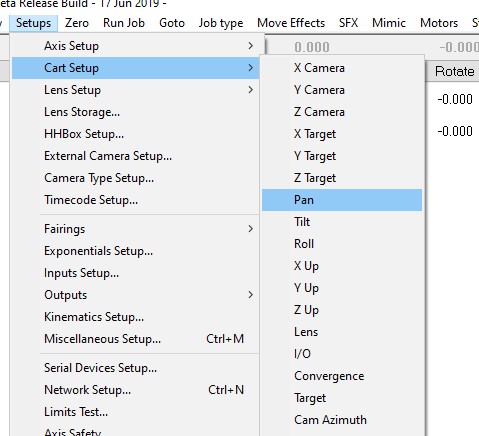
5. Assign the Mimic ports — Setups → Cart Setup → Pan / Tilt
Before assigning inputs in the Mimic window itself, each Cartesian axis needs its hardware port assigned, in the axis's Control tab:
- Go to Setups → Cart Setup → Pan → Control tab. Set Mimic: to Encoder Pos. and Controller: to the Mimic port number you found for that wheel in Step 0 (port labels vary by rootbox — seen in the wild as plain numbers like "Mimic 6", as "Ric Mimic 1", and as "RT Mimic 1"; use whatever your own Test Mimic Input screen showed). Set the Scale/Handwheel Scaling value — examples seen range from
2to-3.00; there is no universal default, and negative reverses direction. Click Apply. - Repeat for Tilt, selecting the other wheel's Mimic port. Click Apply.
6. Assign handwheel inputs in Cartesian Mimic
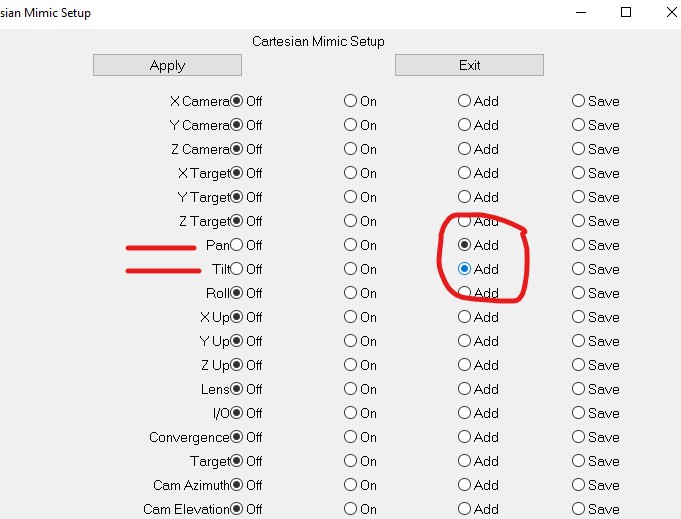
Go to Mimic → Carts Mimic, then assign the handwheel inputs to either:
- Pan and Tilt (if using a rig with a physical pan/tilt head, e.g. a Bolt) — tick Add for both, or
- Target Y and Target Z — which is what the handwheels are actually driving in a non-locked carts system, on rigs without a separate pan/tilt head.
"In your carts Mimic set the handwheel inputs to run either pan and Tilt, or if not run Target Y and Target Z as that is actually what they are doing in a Non-Locked Carts system." — @peter
7. Mimic Learn → Robot Fast → Fwd Run
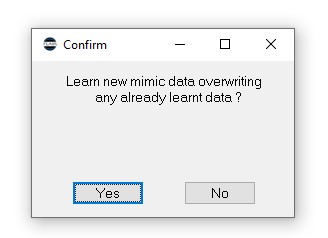
With Mimic set to Learn, run Robot Fast and Fwd Run. You should see a confirmation dialog reading exactly "Learn new mimic data overwriting any already learnt data?" — a larger box than the usual Overwrite Mimic prompt, with a gap in the middle. This is expected and confirms Carts Mimic (not axis mimic) is selected. Click Yes.
Focus Follows Target will not work in Pan/Tilt Tracking mode
Flair will warn you of this at this exact step. Adjust focus manually while recording, rather than expecting it to track automatically.
In the older Classic workflow, Mimic Live is the live-control alternative without recording. Do not assume stationary Live works in Flair 7.7.17: the field report below found input worked only during a programmed run.
8. Run, mimic, and save
Run the move and mimic the axes to follow the action as required. The move ends and is recorded.
Set Mimic back to Off before you replay the move
If you leave Mimic set to Learn and run the move again to check it, Flair will record over and delete the take you just did. Before replaying: set Mimic (Pan and Tilt) back to Off in the Carts Mimic screen, then Robot Fast → Fwd Run → Goto to play back what you recorded. Only switch back to Learn when you deliberately want to record another take.
Save the move in the normal way once you're happy with it (use Save As with a new name to keep the original Hero move intact). To record a different take, set Mimic back to Learn, record again — this overwrites the previous take — and save under a different filename if you want to keep both.
9. Return settings to normal afterwards
Re-enable Cart Control Limits and restore your normal Target Tracking mode once finished. The simplest way is to re-read the original Hero job and use it as the base for the next move, rather than trying to manually reverse every setting change.
Warnings
- Controller moving at start or end can cause weird pre/post rolls. Hold the pan bars/handwheels steady before the robot move begins and after it ends.
- Add extra hold keyframes at the beginning (25–50 frames) and end (100+ frames) of the move — a hand controller still moving when the move ends can corrupt the file, and this also gives the operator time to stabilise before/after the active portion.
- The handwheels do not observe Cartesian limits in this mode — be aware of physical axis limits, especially on large pan moves.
- Replaying the recorded move may trigger speed or acceleration warnings. Check the move graphs and run with caution rather than assuming the recording is clean.
- Use top mount camera orientation if possible, to avoid the camera hitting the rig during wild pans.
- The pan bars' scale ratio can be tuned in the Mimic menu — reduce sensitivity to start, increase if the operator wants more responsiveness.
"Cart Control Limits → Off. Carts Mimic does not watch axis limits when you're driving axes, only when you're driving carts." — Dig (field guide, 2025-04-11)
Setting up Jitter and Axis Parameters
The Cartesian pan and tilt axes have their own axis setup. Go to Axis Setup for the carts pan/tilt axes to adjust jitter settings and other axis-specific parameters separately from the physical axes.
Locking Up / Axes Frozen
If the rig locks and you cannot move any Cartesian axis (even with the mouse), the cause is typically the Cartesian soft limits triggering. To recover:
- Turn off Cart.Control Limits (if safe to do so), or
- Restart Flair.
"This is due to the soft limits in carts somehow locking up. The moment you turn them off (which you don't want to do) you can move it again. But you need to restart Flair for it to work again." — @julian
FBX Export with Pan/Tilt Active
When saving a Cartesian Mimic move back to FBX format, the target/aim information may be partially lost if Pan/Tilt axes are active. If this occurs, send a full Flair bug report (via Flair Reports) including the export file and move details.
Tutorial Videos
Update: the three videos referenced below by name for years — "Set up Cartesian Mimic," "Mimic – Add Move," and "Singularity Example," presented by Fabrizio (MRMC), originally posted to this forum thread, post #9 on 2020-05-11 — were never on YouTube (they were native forum uploads, not YouTube embeds, so they never turned up in a channel or web search). A community member with forum access retrieved the original files and provided them. They are now archived and playable directly below, and on their own page: Cartesian Mimic Handwheels — Forum Videos. Full searchable transcripts are linked with each video.
1. Set up Cartesian Mimic (4:25)
Direct live pan/tilt control in Cartesian mode — see Method A below. Searchable transcript: Open full transcript
2. Mimic – Add Move (4:46)
The full recording workflow — see Method B, Steps 3–9 above. Searchable transcript: Open full transcript
3. Singularity Example (1:37)
The live demonstration behind the singularity warnings on this page. Searchable transcript: Open full transcript
Two general concept videos from MRMC's own YouTube tutorial library are also genuinely relevant and linked inline at the matching step above: Target Tracking "flavours" (Step 3) and Roll Level / Roll Up (Step 4).
Field Guide Screenshots
Screenshots from Dig's field guide (see Official Documentation below) confirming the exact menu paths and dialog text used in the Setup Steps above:
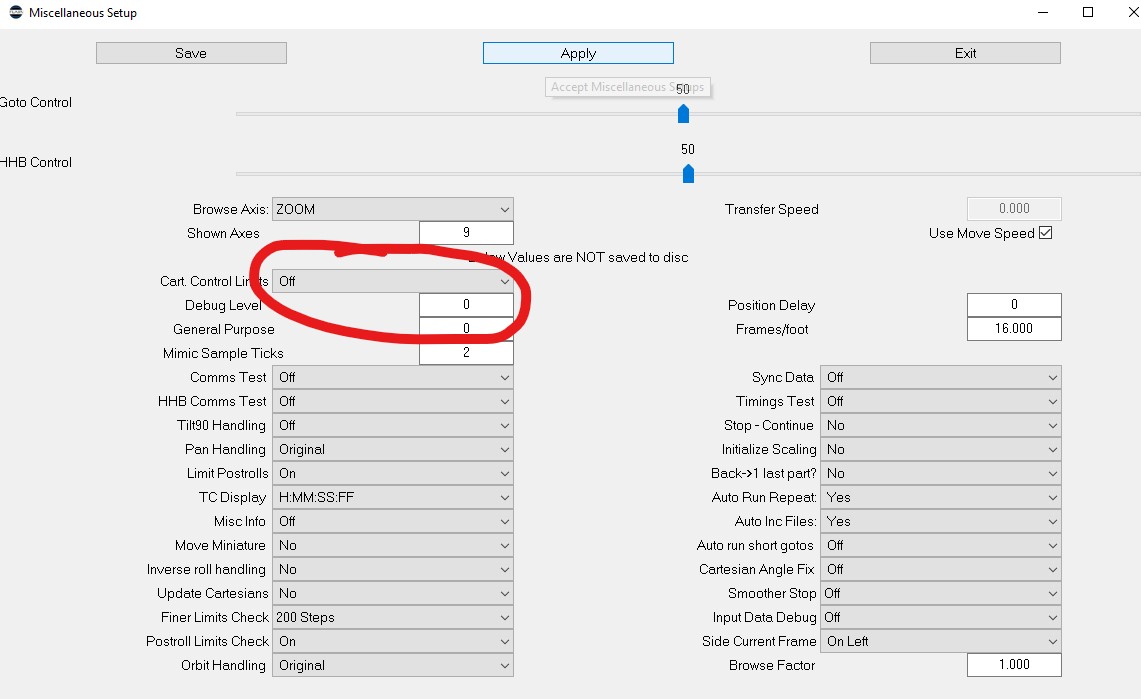
- Media 1: Miscellaneous Setup dialog (Setups menu, Ctrl+M) — Cart. Control Limits field circled, set to Off.
- Media 2: Setups menu — Cart Setup submenu (Pan highlighted) shown alongside Miscellaneous Setup as a separate item, confirming the exact menu structure.
- Media 3: Cartesian Mimic Setup dialog — Pan and Tilt Add radio buttons circled/selected.
- Media 4: Confirm dialog — exact text "Learn new mimic data overwriting any already learnt data?"
Flair 7.7.17 field report — recording wheels over a programmed move
Community evidence — 25 September 2026; Jeremy Andrews and Ben Myers.
Jeremy recorded and replayed Cartesian pan, tilt and roll from MSA21 Ethernet handwheels on a Bolt running Flair 7.7.17. His reported configuration was:
- An existing simple arm move, with no programmed pan/tilt/roll change.
- Locked View Cartesian control and Pan & Tilt target tracking.
- Wheels assigned to Cartesian pan/tilt/roll using velocity control.
- Mimic Learn, recording the additional input while the programmed move was shooting, then saving and playing back the recorded move.
In this test, nothing moved from wheel input in stationary Live mode; input worked during the programmed run. Ben reported comparable Add-during-run behaviour on a Cinebot Mini. This establishes a working recorded-addition case, not general stationary Live support or gamepad compatibility.
Limit settings in this field test
Jeremy disabled Cartesian and velocity limits for his experiment. The report does not establish that this is necessary for every Add setup. Earlier guidance on this page says limits can remain enabled for an Add-only pan/tilt tracking move. These configurations have not been reconciled by a controlled comparison. Do not treat the experiment as a blanket instruction to disable protection; verify the mode and limits with support before operating near a singularity.
11 September — Simon Wakley and Peter Constan-Tatos: distinguish live-only input from Mimic Add recording. Save each learned pass, then return the affected channels to Play to repeat the chosen performance. A free live variation is not repeatable unless recorded. Six-axis robots have camera/arm collision and singularity constraints that differ from separate pan/tilt heads.
See Adding Handheld Feel and Flair 7 gamepad/Mimic limitations. Dig's document re-shared on 26 September is the same older Classic field guide linked below, not a new Flair 7 procedure.
Related Guides
Related Issues
- Mimic Cartesian Pan — Gamepad in Flair 7
- Mimic Focus — Learn Not Live
- Gamepad HHB Browse / XCam
- Adding a Track Axis to a Tracker App Recording
- Xbox Controller — Cartesian Live Broadcast Control
- Tracker Live Recording / Mimic Window
Official Documentation
- Setting Up MRMC Mimic Handwheels for Cartesian Mimic on a Bolt Pan/Tilt — original 2020 forum thread (community Q&A, prerequisites, and Setup Steps above)
- Cartesian Mimic Pan/Tilt in Flair 7 with Pan Bars — Flair 7-specific forum thread (2024)
- Dig's field guide — HOW TO USE CARTS MIMIC (ON BOLTS).docx — community-contributed Word document, shared via WhatsApp 2025-04-11; source for the exact menu paths and screenshots above
- Cartesian Mimic Handwheels — Forum Videos — Fabrizio's three original forum videos, recovered and hosted here with full transcripts