title: "Bloop Light Programmed But Not Firing" issue_id: TRIG-bloop-not-firing category: Camera Triggering issue_status: RESOLVED hardware: All rigs with Trigger Box software: BOTH first_seen: 2021-01-01 last_seen: 2024-06-01 contributors: - Tom D - Niko - Simon Wakley - Gordon Eschke date: 2024-06-01 search: boost: 2.0 tags: - Flair 7.1.0
Related Issues
- Freefly WAVE Camera GPIO Trigger — Custom Cable Wiring
- HyperDeck Review Appears Half-Frame Off
- ARRI Alexa 35 — Enhanced Sensitivity (ES) Mode Kills Sync Output
- Bloop Light Laser Pointer Faint or Not Working
- IR Beam / Photocell / Solenoid Trigger Workflows
- All Trigger Outputs Suddenly Dead — Check Main Triggers Toggle Button
Bloop Light Programmed But Not Firing
Summary
A bloop light (in-frame flash light used to mark the first frame of a move) is programmed in Flair but does not fire. There are three distinct causes, each with its own fix.
Symptoms
- The bloop light is programmed in Flair but does not flash when the move runs.
- Flair shows the bloop trigger as active in the setup but Output 1 of the Trigger Box produces no pulse.
- The bloop fires correctly on a manual test but does not fire during the automated run.
- All trigger outputs are suppressed — not just the bloop — and the robot may be in Slow mode.
Background
The bloop light is a bright flash of light placed in-camera-frame, triggered by Flair at a precise frame to mark the start of a move. It is used in multi-pass compositing workflows where precise sync is not available — the bloop frame is used to align passes in post.
The bloop is typically connected to Output 1 of the MRMC Trigger Box (DB37 ribbon cable device, 12V relay outputs).
Cause 1 — Robot Not in Fast Mode
Trigger Box outputs only fire when the robot is running in Fast mode. If the robot is running in Slow mode, triggers (including the bloop) are suppressed.
Fix: Set the robot to Fast mode before running the move.
Triggers require Fast mode
This applies to ALL Trigger Box outputs, not just the bloop. If you are using any trigger output (camera record start/stop, bloop, relay) and the robot is in Slow mode, none of them will fire.
Cause 2 — Triggers Switch Not Active
The Triggers enable switch (in the main Flair window or toolbar) must be active (enabled) for any trigger to fire.
Fix: Check that the Triggers switch is on before running the move.
Cause 3 — Ultibox-Routed Bloop Needs Manual Pre-Test
When the bloop is routed through an Ultibox (rather than direct from the RT14 trigger output), there is a known timing issue where the bloop does not fire on the first run unless it has been manually tested immediately before entering Ready to Shoot.
Fix: 1. Open the Trigger Test window in Flair 2. Click Test (fires the bloop manually) to wake up the Ultibox relay 3. Immediately proceed to Ready to Shoot and run the move
Ultibox bloop quirk
This is a known Flair / Ultibox behaviour. The manual test pulse appears to prime the relay for reliable firing on the subsequent automated run. This step is only needed for Ultibox-routed outputs, not direct RT14 trigger outputs.
Cause 4 — Bloop Fires After Pre-Roll Instead of During It (Version Bug)
A separate, distinct symptom from the three causes above: the bloop is programmed to fire during the first few frames of pre-roll, but instead fires only once the actual move starts — i.e. pre-roll is being ignored by the bloop trigger. This has been seen across multiple Flair versions and, as of 2026-06-14, was still unpatched in 7.7.17.
"We are having issues with our bloop triggering during our pre-roll. Our intention is to have it Bloop during the first few frames of pre-roll. We have 2 seconds of pre-roll, but it Bloops after pre-roll, when the move starts." — community, Flair 7.7.17 on Mac with a Nano, 2026-06-14
"Okay - we saw that in 7.12, sounds like they didn't patch it yet." — Tom D, 2026-06-14
Fix / workaround:
- Add a 2-second hold at waypoint 1 instead of relying on pre-roll timing for the bloop — this was confirmed to work as a direct substitute.
- Alternatively, use negative triggers rather than a pre-roll-relative bloop frame.
- On Classic specifically, Simon Wakley noted: "Bloop on at frame -2 should fire in the preroll (classic) but a short hold at start also works" — so a Classic-side fix may differ slightly from the 7.x behavior; test both if you're on Classic.
- Distinguish this from Camera Pre-Roll (External Camera Setup → Ramp Frames), which is a different setting entirely and not a real move pre-roll — Timothy Heys Cerchio: "if [it] means Camera pre roll as in External Camera Setup - Ramp Frames, this is not a real move pre-roll... So, as others have confirmed: use negative Triggers or a Hold at the beginning of the move."
confidence_score: 0.75
Checklist
Before assuming the bloop hardware is faulty, verify all four causes:
- [ ] Robot is in Fast mode
- [ ] Triggers switch is enabled in Flair
- [ ] If Ultibox-routed: clicked Test immediately before Ready to Shoot
- [ ] If bloop is meant to fire during pre-roll specifically: try a hold at waypoint 1 or negative triggers instead of relying on pre-roll timing (still an open bug as of 7.7.17)
Related Media
Media Text / Description
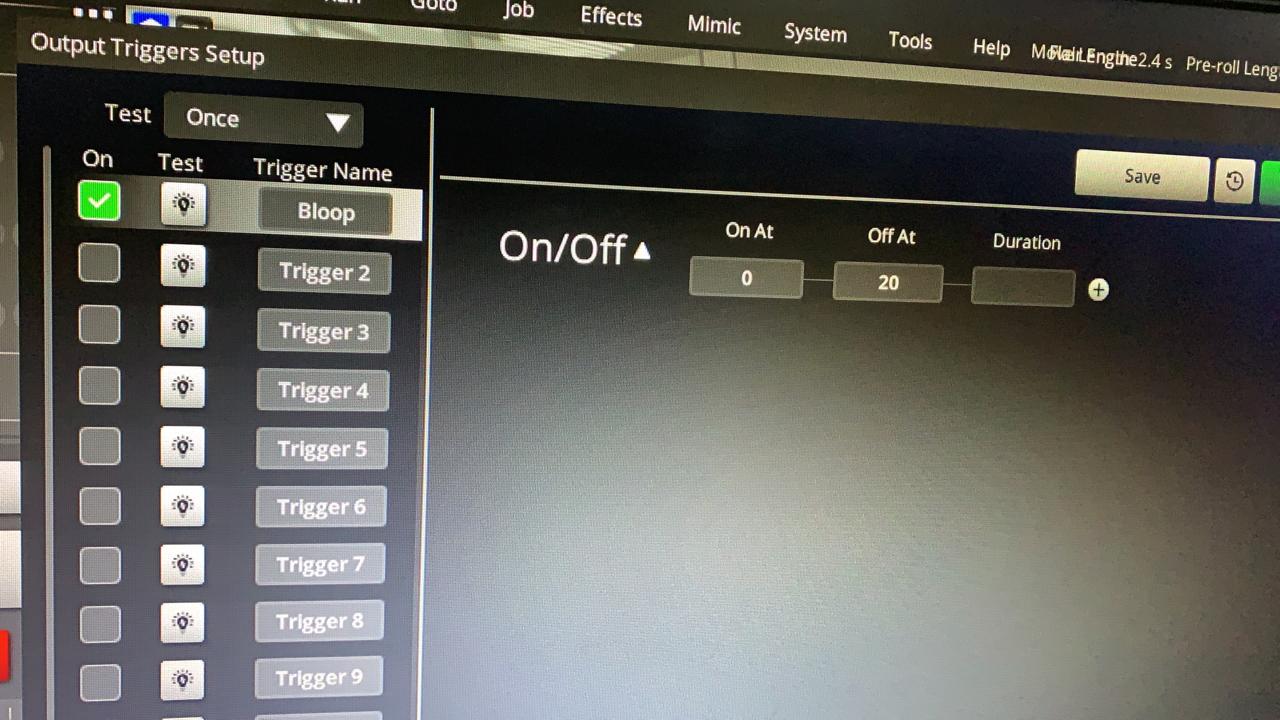
- Media 1: 2021-08-13 07:53 - Oscar Molano asked why a programmed bloop light tested OK and was active in settings, but did not light during the move. He attached .
WhatsApp Excerpts
- 2021-08-13 07:53 - Oscar Molano asked why a programmed bloop light tested OK and was active in settings, but did not light during the move. He attached
00005387-PHOTO-2021-08-13-07-53-30.jpg. - 2021-08-13 07:58 - Simon Wakley replied that triggers only fire when the robot is running in
Fastmode. - 2021-08-13 08:01 - Oscar said it still was not turning on in Fast mode.
- 2021-08-13 08:08 - Peter Constan-Tatos described a similar issue when bloop was routed from the UltiBox camera accessories output: opening the test window and clicking
Testimmediately beforeReady to Shootmade the bloop work when shooting. - 2021-08-13 08:15 - Simon Wakley asked for software version and whether rebooting had been tried; Oscar later reported Flair 7.1.0 and said he would try rebooting.
References
- Flair Operator Manual — Triggers / Camera Record Setup (Flair Classic — Ch.19 Inputs, Outputs & DMX: Triggers On/Off — p.286 · Flair 7 — Ch.16 Inputs, Outputs and DMX: Triggers On/Off — p.236)
- MRMC Trigger Box Quick Start Guide