Macro / Probe Lens Shake - Rigging, Speed, and Support
Summary
Macro and probe lenses magnify mechanical vibration. The recurring advice is to avoid probe lenses when a normal macro lens will do, keep the nodal point close to the tilt/roll axis, use rigid camera mounting and lens support, avoid unnecessary track moves and direction changes, and test speed/fps combinations rather than assuming slower is always smoother.
Symptoms
- Laowa probe on Bolt Jr+ gives unsatisfactory results in the macro area.
- Image shakes even with smooth fairings and smooth speed profile.
- Macro/skaterscope setup shakes badly.
- Probe lens support is clamped but the image still vibrates.
- Long probe sticking far forward from the rig makes the arm and camera more sensitive.
Community Solutions
[CONFIRMED] Improve camera mounting rigidity
Use a proper cage/baseplate/bridge plate and all available camera mounting screws. Flexible camera cages, especially on small camera bodies, can be the source of visible shake.
Confidence: 0.86
[CONFIRMED] Support the probe tube and reduce clamp flex
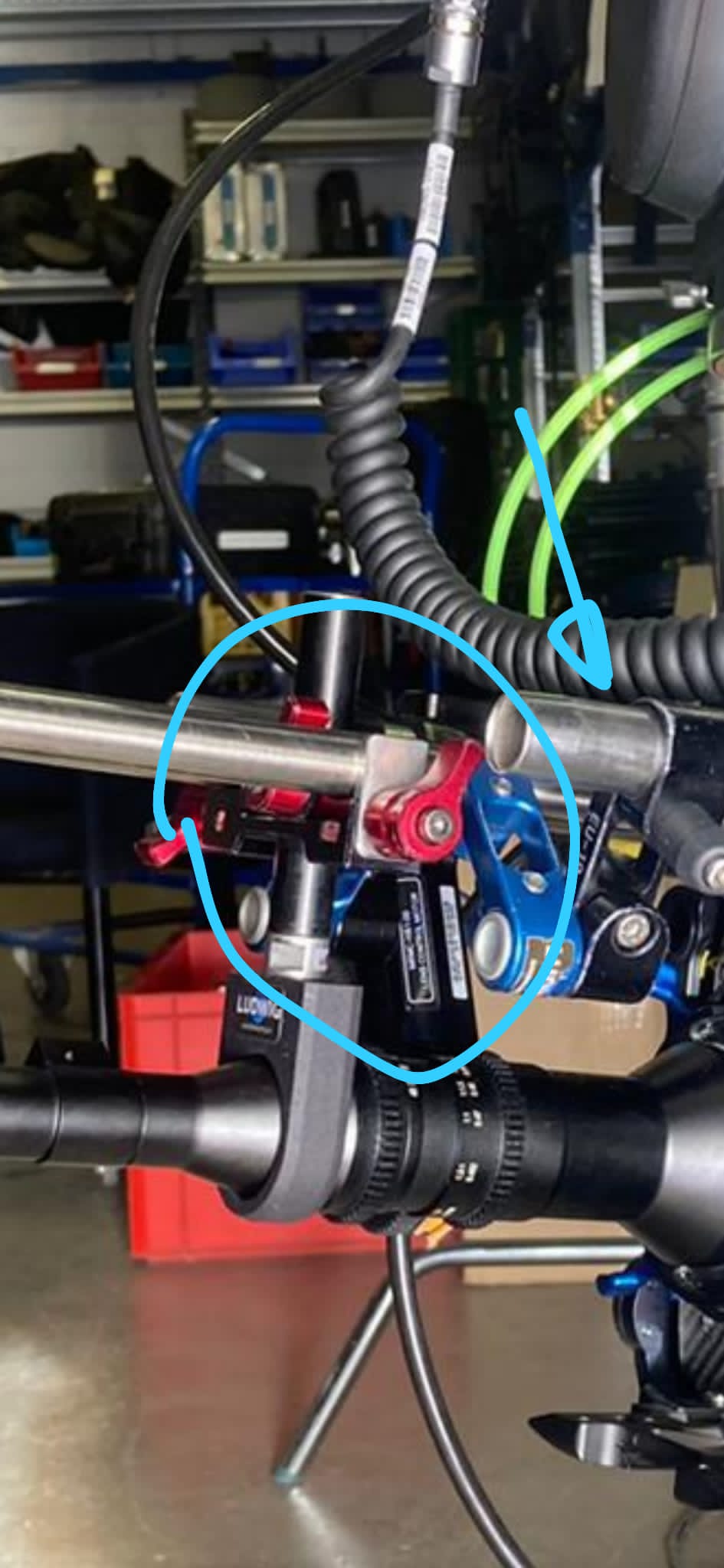
Use longer rods or more direct lens support where possible. Avoid stacked clamps and narrow, flexible support paths.
Confidence: 0.8
[LIKELY] Prefer macro lenses close to the node over probes
If the shot allows it, a normal macro lens mounted close to the tilt/roll node will usually shake less than a long probe.
Confidence: 0.82
[LIKELY] Use side mount + turntable for small products
For jewellery, watches, and similar products, the combination of turntable object spin and side mount for vertical arcs was recommended as a stable macro workflow.
Confidence: 0.78
[LIKELY] Smooth the move physically and in graphs
Avoid or minimize motor direction changes, avoid track moves where possible, keep the arm from being fully extended, and look for smooth gentle curves in the graphs.
Confidence: 0.8
[FIELD WORKAROUND] Use fps/speed tests
For inanimate objects, test robot speed and camera frame rate together. Sometimes a slightly faster or slower move is smoother. Shooting at double fps can leave room for minor post speed ramps.
Confidence: 0.72
[FIELD WORKAROUND] For probes, consider 90 degree snorkel/end-mounted mass
One field solution for probe work was to use a 90 degree snorkel/probe, physically end-mount the camera so the mass hangs under the arm, and tell Flair the setup is top mount with the sensor at the lens node. This can be more stable than a long probe sticking out the front.
Confidence: 0.72
Community Media
Shared by community members during discussions about probe/macro lens rigging and shake reduction.
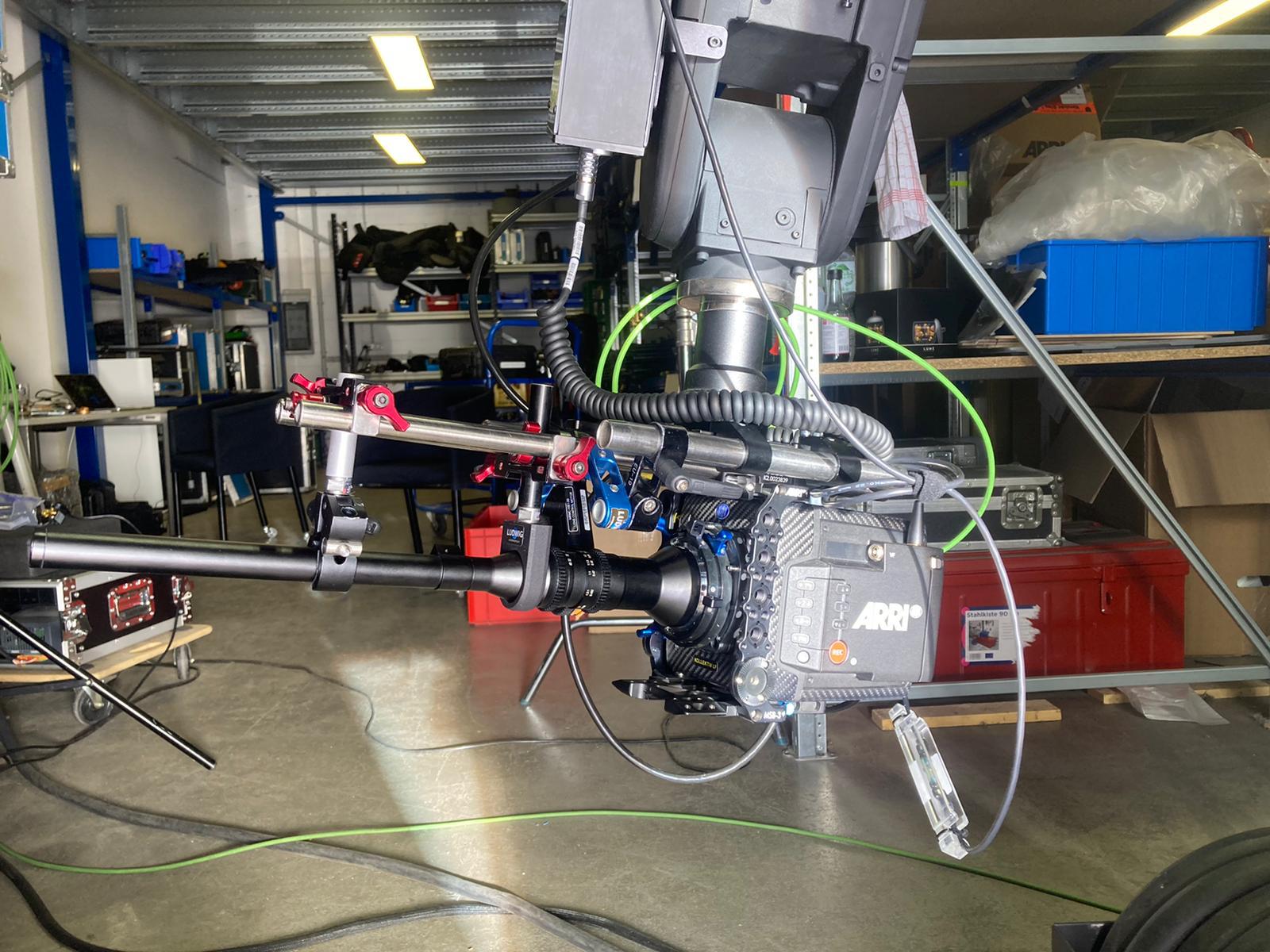
- Media 1 (Photo — plamenbontchev, Jul 2021): Alexa Mini LF on Bolt Jr+ top-mounted to MRMC plate without a baseplate — the problematic mounting that caused probe lens shake. Dan Gottesman identified the close-together mounting holes as insufficient; Timothy Heys Cerchio noted the cage only attaches to 4 small screws with natural flex.
- Media 2 (Photo — Niko, Jul 2021): Suggested rigging approach using longer rods to reduce stacked clamps and shorten the flex path for the probe lens support. Context: reply to Plamen's shake problem, recommending more direct, rigid support.
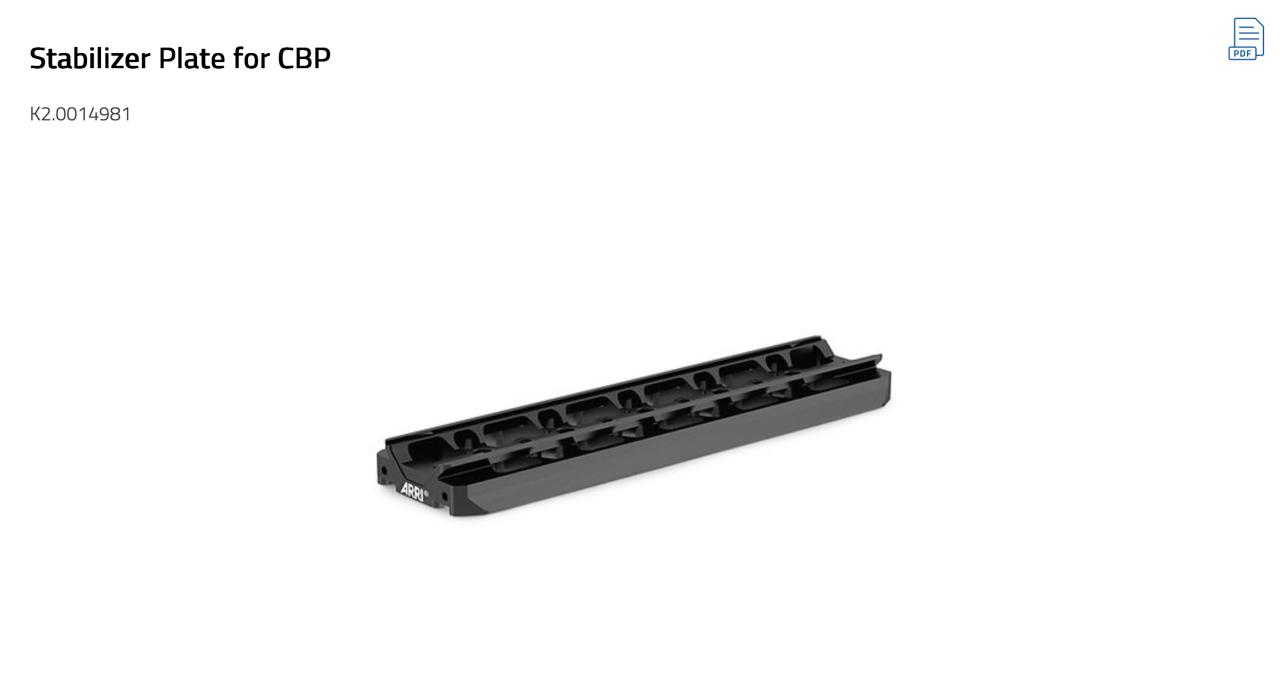
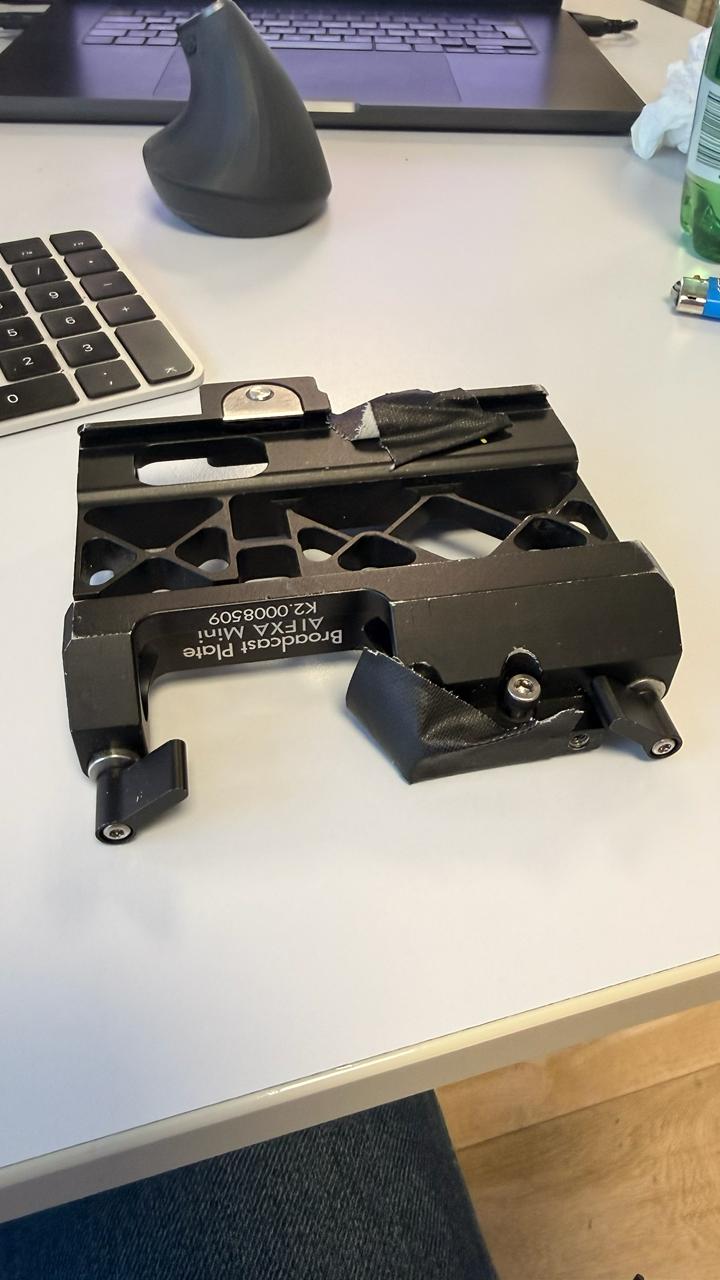
- Media 3 (Photo — Sebastien Renardet, Apr 2026): ARRI bridge plate / sliding baseplate used to shift the camera fore/aft so the nodal point aligns with the tilt/roll axis — confirmed by Timothy Heys Cerchio as correct approach for Bolt Jr+ macro work.
- Media 4 (Photo — Sebastien Renardet, Apr 2026): Second photo of the sliding baseplate setup. Timothy confirmed: "Yes" — this is the right system.
- Media 5 (Video — plamenbontchev, Jul 2021): The shaking probe move on Bolt Jr+ that prompted the discussion. Sent alongside "That's the move… Right now we have it mounted with three 3/8 screws on top."
- Media 6 (Video — Tom D, Apr 2026): Snorkel probe (lens 90° to tube) with camera physically end-mounted so it hangs down — setup tells Flair "top mount" with x-offset to lens node. Tom D: "most stable results… all the mass hanging under the arm is much more desirable than using a probe sticking far out the front." Bolt Jr+ setup.
- Media 7 (Video — Tom D, Apr 2026): Same snorkel probe / end-mount approach shown on full Bolt arm. Tom D: "same applies to our Bolt Jr+ too."
WhatsApp Excerpts
| Timestamp | User | Evidence |
|---|---|---|
| 2020-12-07 22:46 | Anton Vikstrom | "Macros with a flex 4k and a skaterscope also shakes like crazy." |
| 2021-07-14 22:28 | plamenbontchev | "Laowa probe lens ... Bolt Jr+ ... can't really get satisfactory results especially in the macro area." |
| 2021-07-14 23:20 | plamenbontchev | "Yes... it's shaking." |
| 2021-07-15 00:04 | Dan Gottesman | "Try flipping the camera upside down, and using the baseplate to connect to the MRMC plate." |
| 2021-07-15 00:34 | Timothy Heys Cerchio | "The problem there is definitely the Alexa Mini 'cage' supports ... it naturally has quite some flex." |
| 2021-07-15 00:48 | Peter Constan-Tatos | "The camera cage is important, use all 8 M4s on the mini, 4 top and 4 bottom onto the cage." |
| 2026-04-02 17:03 | Arturo | "Avoid probes, I recommend Macro lenses and set them close to the tilt/roll axis node." |
| 2026-04-02 17:36 | Timothy Heys Cerchio | "Bolt Jr extreme macros ... Turntable for the object spin and Side Mount for tilting vertical arcs works pretty well." |
| 2026-04-02 17:49 | dennis | "Avoid /minimize motor direction changes ... Avoid track moves ... minimize how far out in space the camera is." |
| 2026-04-02 18:06 | Timothy Heys Cerchio | "Move at the speed that gives you best performance (between shake on fast moves and vibration on slow moves)." |
| 2026-04-04 10:31 | Tom D | "Most stable results using the snorkel probe ... physically end mounting camera ... setup in Flair is top mount ... lens support for macro tube goes a long way." |
Cinebot Mini + Laowa Probe + V-Raptor — Shake Specifically in Target Tracking (2026-07-20)
A distinct hardware combination from the Bolt Jr+ cases above: a Cinebot Mini running the Laowa 24mm probe with a V-Raptor, payload calculated via Polyscope. Moving each axis motor individually was smooth, but as soon as target tracking combined all motors, shake became bad enough to make footage unusable — even on simple, slow moves.
Symptoms
- Smooth motion when moving axes individually.
- Shake becomes severe specifically in target tracking mode, where multiple axes move together.
- Persists even on simple, slow moves — not just fast/complex ones.
Community Guidance
"With Cinebot range it usually help to program moves starting close to base and moving away. Also keep the camera always lower than your rotate axis." — 31 6 27072527, 2026-07-20
"Also go for the DZO probe instead of the Laowa." — 31 6 27072527, 2026-07-20
"It's not always possible but I'll typically try to minimize the number of axes needed to perform the move and I'll try to minimize focus or zoom since the Tilta motors can sometimes cause the lens to flex. Also try to mesh the Tilta motors with a slight air gap." — Ben Myers, 2026-07-20
"Also, be wary of 'cropping factor' on your RED... The tighter the picture the worse the visible shake gets." — Timothy Heys Cerchio, 2026-07-20
"Sometime moving / accelerating faster helps too." — 31 6 27072527, 2026-07-20
"If you are shooting something very close to the lens, you will probably notice much more shaking than a farther object. You need to test your best arm position, object distance, speed…. There's no magic formula." — Niko, 2026-07-20
"Also stabilising in post is often easier then trying to get smooth move in camera. Atleast in my experience." — community, 2026-07-20
Additional checklist for Cinebot range + probe/macro in target tracking:
- Prefer DZO probes over Laowa where the shot allows it — reported as noticeably more stable.
- Program moves that start close to the robot's base and move outward, rather than starting extended.
- Keep the camera lower than the rotate axis where possible.
- Minimize the number of active axes and focus/zoom motor use — each additional moving axis in target tracking is a potential shake source.
- Leave a slight air gap when meshing Tilta motor gears rather than a tight mesh.
- Watch RED sensor crop factor — a tighter crop amplifies the same physical shake into a more visible image artifact.
- Counter-intuitively, try a faster acceleration/speed — slower isn't always smoother.
- If in-camera smoothness can't be achieved, budget for post stabilization as a valid fallback rather than over-rigging in the field.
confidence_score: 0.72
Bolt Wrist / Camera Cage Wobble During Acceleration
From a community thread (2022-08-10) reporting shake specifically at the Bolt wrist or camera cage during acceleration and deceleration, distinct from probe-lens shake.
Symptoms
- Camera image shakes at the start and end of moves (acceleration/deceleration), particularly with a macro or long lens.
- Shake appears to originate at the Bolt wrist or camera cage connection rather than the lens support.
- Shake is present on wide lenses as well as macro lenses (distinguishes wrist/cage wobble from probe shake).
Community Checks
Check these in order before assuming the issue is move-related:
- Compare macro/long lens vs a normal lens — if the shake is much worse with a long or macro lens, the flex is being amplified by the lever arm. A small amount of cage flex becomes large movement at the front of a long lens.
- Check all bolts holding the camera cage — vibration and repeated handling can loosen camera cage bolts. Tighten all cage-to-camera attachment points.
- Check base screws of the pan axis — the pan axis base plate can loosen where it attaches to the wrist. Tighten all fasteners at this joint.
- Check fairings — loose or ill-fitting fairings can act as a resonating panel and amplify the perceived shake.
- Check ground / surface stability — an uneven, compliant, or vibrating floor surface can excite the Bolt structure. Use all levelling feet or a stable platform.
- Test with only large axes for macro — where possible, design the macro move to use only the larger joints (track, lower arm, shoulder) and minimise wrist/pan/tilt motion. The smaller distal axes have the highest gearing ratios and can introduce micro-jitter.
"Check bolts holding camera cage, check base screws of pan axis, compare macro vs normal lens, check fairings, check ground stability." — Community (2022-08-10)
Related Issues
- See also: Probe / Macro Lens Setup Roundup - Problems and Solutions
- See also: Probe Lens Camera Mount / Tilting Lens - Tube Length, End Angle, and Offsets
- See also: Probe / Macro Lens Flips Because Target Is Behind Nodal Point
- See also: Periscope / Borescope Gimbal Lock - Use Top Mount Style Setup
- See also: Sony Venice / Rialto On Bolt - Cable Management and Body Placement
- See also: Turntable People / Large Platform Loading
- LiDAR / Focus Assist Rigging — Preventing Shift on Fast Moves
- Milo Long Arm — Toppling Risk During Arm Reconfiguration
- Bolt Jr+ — Shake Appears Only While Traveling on Track
- Live Joystick Moves Can Be Smoother Than Programmed Waypoint Moves