Cinebot Mini Part Run Stops With D/A Overflow
Summary
If a Cinebot Mini part run stops at the beginning with a D/A overflow message, distinguish it from a magnet-limit trip. Community guidance says D/A overflow usually means Flair's requested motor output does not match encoder feedback closely enough, often because the track motor/gear is obstructed or a drive sensor/connection is missing.
Symptoms
- Error appears at the beginning of a Part Run.
- Move stops immediately.
- Operator is in the middle of track, not on a magnet limit.
- Error is D/A overflow, not "tripped by limit."
Community Guidance
[LIKELY] Check obstruction, track motor/gear, and drive sensor connection
2025-07-11 — Paul Marke / Simon Wakley / Timothy Heys Cerchio / David Jeffries
- Do not treat this as a magnet limit if the message is D/A overflow.
- Check whether the track motor, gear, or drive path is obstructed.
- Check the drive motor sensor/encoder connection.
- If it appeared after loading a job, try opening a previous known-good job.
- Use simple load to bring back waypoints without carrying over suspect setup state.
confidence_score: 0.78
Related Media
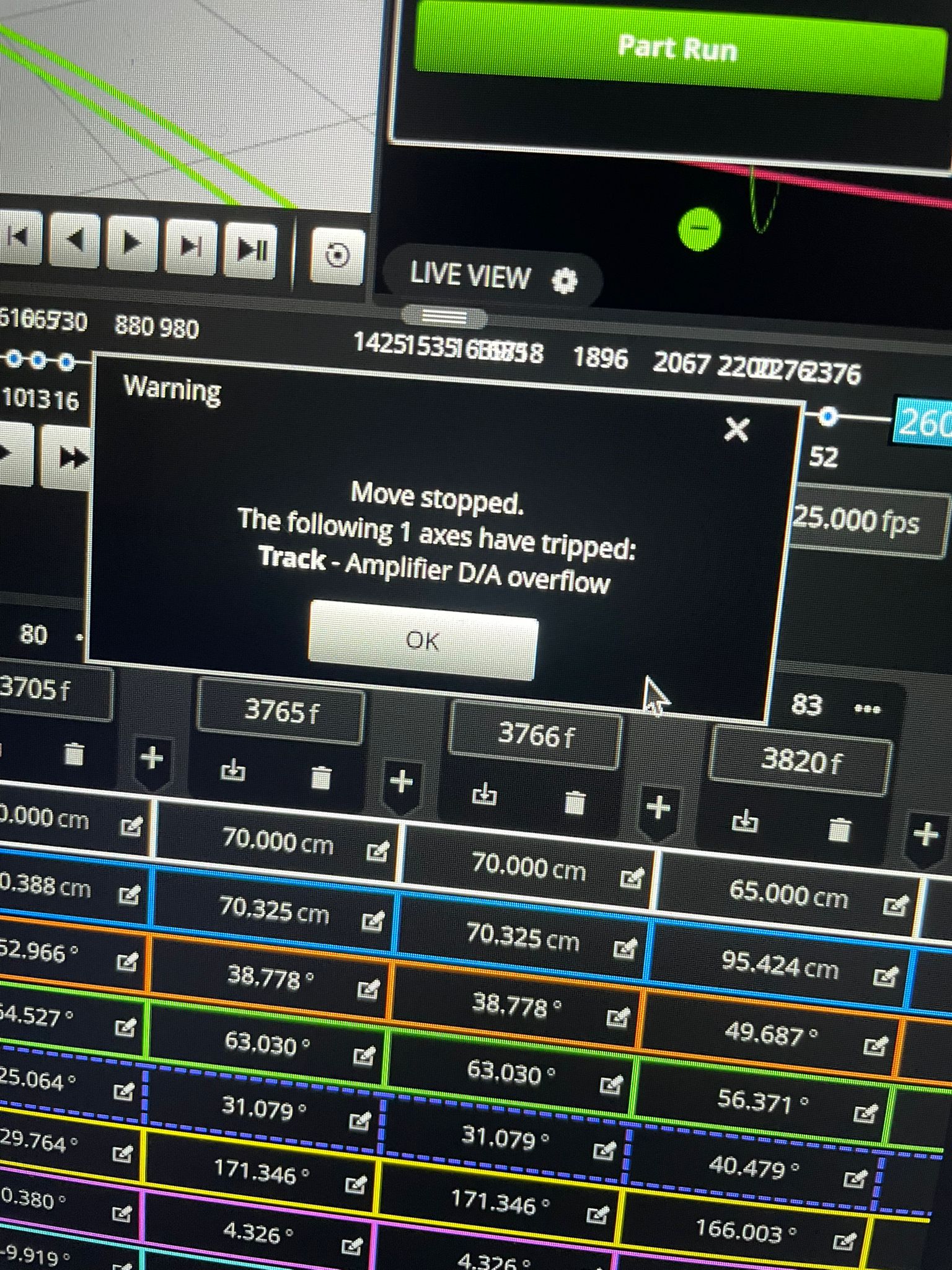
Media description: Flair warning popup during Part Run. Visible text reads: Warning - Move stopped. The following 1 axes have tripped: Track - Amplifier D/A overflow. The screenshot also shows the green Part Run button and waypoint/frame cells behind the popup.
Media Text / Description
Warning - Move Stopped - Track Amplifier D/A Overflow
Exact visible popup text: Warning - Move stopped. The following 1 axes have tripped: Track - Amplifier D/A overflow.
- Exact searchable error text: Warning - Move stopped. The following 1 axes have tripped: Track - Amplifier D/A overflow.
- Screenshot error text / image description: Cinebot Mini part run stops with a D/A overflow warning at the start of the move; green Part Run button visible behind the popup.
- Media 1: Warning popup: Move stopped. The following 1 axes have tripped: Track - Amplifier D/A overflow.
WhatsApp Excerpts
[11/7/2025, 6:44:52 am] ~ Paul Marke: Has anyone had this error before and knows how to fix? It happens at the beginning of a Part Run and stops the move
[11/7/2025, 6:48:55 am] ~ Paul Marke: Using a Cinebot Mini here
[11/7/2025, 6:52:32 am] ~ Mike Greenberg: Did you hit the magnet limit on your track? That would produce that error.
[11/7/2025, 7:00:59 am] ~ Paul Marke: We were just in the middle of the track somewhere, so I don’t think so
[11/7/2025, 7:26:49 am] ~ Simon Wakley: No, that will produce a tripped by limit not a D/A overflow.
[11/7/2025, 7:37:28 am] Timothy Heys Cerchio: Usually happens when something obstructs the Track motor/gear/etc..
D/A overflow means Digital to Analogue where the Digital motor request from Flair does not correspond to an equivalent (within minimum tolerance) Analogue feedback from the Encoder on the motor.
[11/7/2025, 7:39:06 am] ~ David Jeffries: Not sure about the cinebots, but I know it pops up if you forget to plug in the sensor for the drive motor for the bolt 😅.
Related Issues
- See also: Track Amplifier D/A Overflow Error
- See also: Track Axis Trips 1–2 Seconds After Engagement
- See also: Part Run Sections - Selectable Sections and OSC Commands