Bolt X Network Error Persists After Cable/Hub/PC Swap — Unstable Base Ethernet Port
Summary
If a Bolt X network error persists after replacing all external network cables, the hub, and even the computer, inspect the Ethernet port/path inside the robot base. In the field case, the operator found the robot-base Ethernet port was unstable and was advised to send a report to MRMC.
Symptoms
- Bolt X with Flair 7.7.7 shows a network/communication error.
- Same problem appears in Flair Classic.
- Replacing all network cables does not solve it.
- Replacing the hub does not solve it.
- Replacing the computer does not solve it.
- Robot-base Ethernet port appears unstable.
Community Guidance
[LIKELY] Check internal base network path and try a direct cable
2025-12-23 — Dragon Zhang / Arturo / Stafford
- Confirm the hub is connected to the correct Ethernet port.
- Check all Ethernet cables.
- Check whether the hub inside the Bolt X is sending data.
- Inspect the robot-base Ethernet port for intermittent connection.
- Try running another cable directly from the black box to the robot.
- Send a report to MRMC if the base port is unstable.
confidence_score: 0.78
Related Media
Media Text / Description
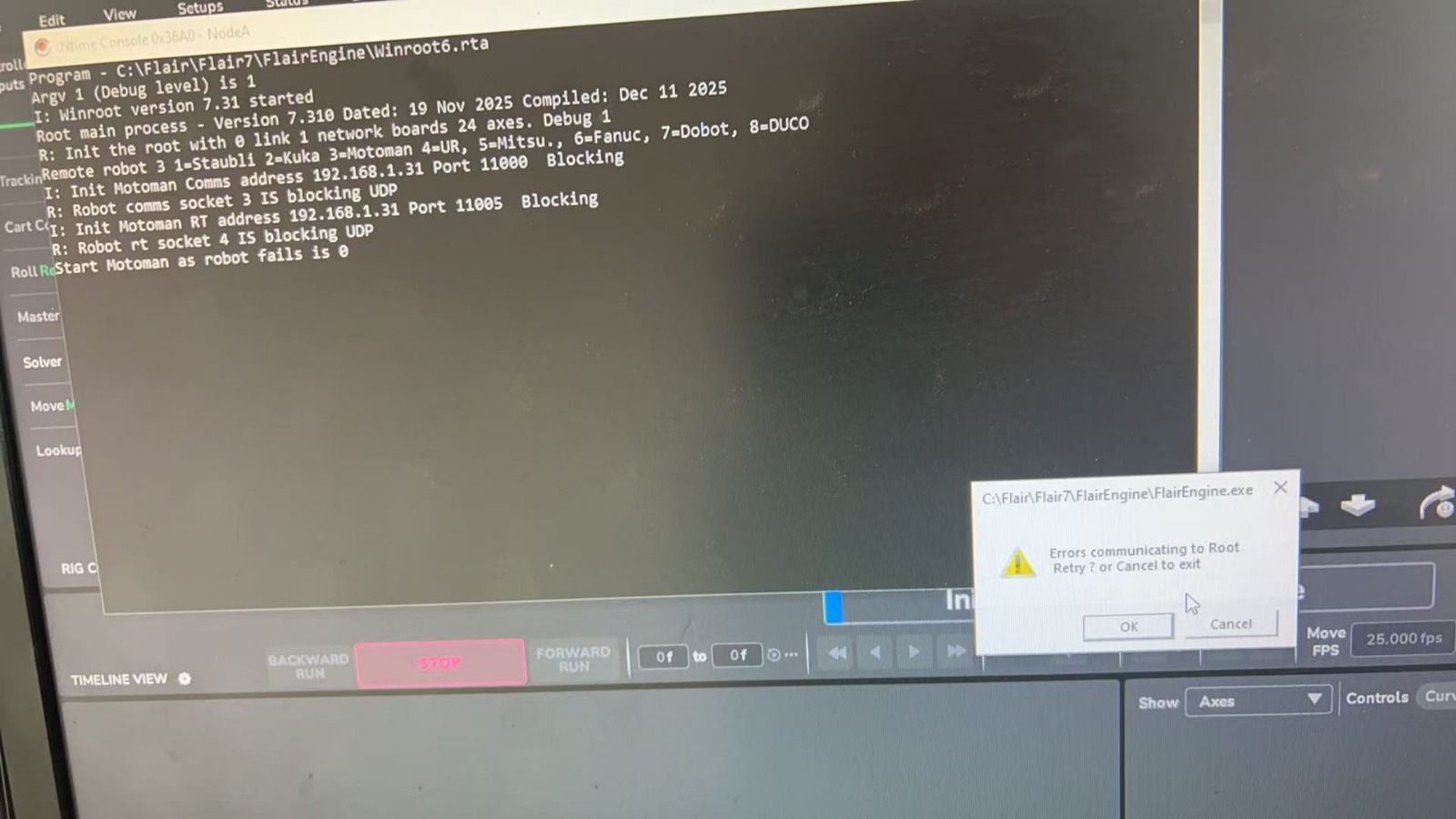
- Screenshot/error description: Bolt X network or communication error persists after replacing external network cables, hub, and computer; base Ethernet port/path appears unstable.
- Media 1: Screenshot/error description: Bolt X network or communication error persists after replacing external network cables, hub, and computer; base Ethernet port/path appears unstable. Source file: 00035561-VIDEO-2025-12-23-13-37-29.mp4.
- Media 2: Screenshot/error description: Bolt X network or communication error persists after replacing external network cables, hub, and computer; base Ethernet port/path appears unstable.
WhatsApp Excerpts
[23/12/2025, 1:17:08 pm] ~ Dragon Zhang: Hi, anyone can help me fix this error
[23/12/2025, 1:17:31 pm] ~ Dragon Zhang: I already replaced all the network cable and the computer
[23/12/2025, 1:18:02 pm] ~ Dragon Zhang: it is a boltx with flair 7.7.7
[23/12/2025, 1:18:28 pm] ~ Dragon Zhang: Same problem on the Flari calssic
[23/12/2025, 1:25:15 pm] ~ Arturo: Is the HUB is well connected? Is it in the proper ethernet port?
[23/12/2025, 1:26:03 pm] ~ Dragon Zhang: I also replace the hub
[23/12/2025, 1:28:51 pm] ~ Dragon Zhang: should I check anythings else?
[23/12/2025, 1:37:29 pm] ~ Dragon Zhang: the port 4 is connect to the robot, not flashing
[23/12/2025, 1:37:49 pm] ~ Dragon Zhang: is this normal?
[23/12/2025, 1:50:08 pm] ~ Arturo: I think it’s normal
[23/12/2025, 1:50:39 pm] ~ Arturo: Have you reboot the whole system? Robot and PC?
[23/12/2025, 1:51:09 pm] ~ Dragon Zhang: Yes, I did many times
[23/12/2025, 1:52:22 pm] ~ Dragon Zhang: Just found a problem on the robot base, the ethernet port is not stable
[23/12/2025, 1:52:55 pm] ~ Arturo: Ok, then, I think you should send a Report to MRMC. They should tell you how to fix that problem
Related Issues
- See also: EtherCAT "Network Communications Not Running" — Systematic Troubleshooting
- See also: Bolt Will Not Engage After Camera Change — Staubli / Network / E-Stop Checks
- See also: Base Engages but Arm Does Not — Ethernet Card / Base Network Fault