Flair.ini and UI Operator Tips - DefaultFrameInc, Browse Speed, Screen Size
Summary
Several small but important Flair workflow fixes are buried in the WhatsApp chat rather than in issue pages: changing the default frame increment for new keyframes, speeding up browsing by temporarily changing frame rate, and setting Classic window size/position through Flair.ini.
Symptoms
- New keyframes are added at an unexpected default frame interval and you want to change the default increment in Flair.
- Browsing a long move is too slow even with HHB speed at 100% and you need a workaround.
- The Flair Classic window appears in the wrong position or at the wrong size on a high-resolution or multi-monitor setup.
- You want to configure the Classic UI window size and position persistently via
Flair.ini. - You are unsure which
Flair.inito edit on a system with both Flair Classic and Flair 7 installed.
Stable ID
ISSUE-FLAIR-001
First Reported
2020-05-23 - default frame increment question.
Additional Reports
- 2020-06-20 - browse speed too slow at 100% HHB speed.
- 2022-06-24 - recommended screen resolution for Flair 7.
- 2023-02-09 - Classic UI scaling/position on a 1440p monitor.
Software Environment
Both. Most ini settings apply to the Classic engine. Flair 7 installations may store the active Classic engine ini under a Flair 7 subfolder, so confirm the exact folder before editing.
Installation Context
Classic only, Flair 7 only, and dual-install systems. Highest risk after copying/upgrading Flair folders because the operator may edit the wrong Flair.ini.
Community Solutions
[CONFIRMED] 2020-05-23 - User: Niko
To change the default frame increment when adding new keyframes/lines, edit:
in Flair.ini.
For a temporary/current-job workaround, use incremental frame mode or type relative values in the frame column.
confidence_score: 0.88
[CONFIRMED] 2020-06-20 - Users: Niko, Julian Hermannsen
If browsing a long move is too slow even with HHB speed at 100%, changing Browse Axis Speed may not help. 100% HHB speed is effectively 100% move speed, and on Bolt can be reduced by robot slow/fast behavior. A practical workaround is to temporarily raise the project frame rate while browsing, then restore the correct frame rate before shooting.
confidence_score: 0.82
[CONFIRMED] 2022-06-24 - User: Timothy Heys Cerchio
Full HD was suggested as a practical Flair 7 screen resolution when a user had to scroll around a lot.
confidence_score: 0.70
[CONFIRMED] 2023-02-09 - Users: Timothy Heys Cerchio, Gordon Eschke
For Classic UI sizing/position, add or edit these Flair.ini values:
ScreenX and ScreenY define how far from the top-left corner the window sits by default.
confidence_score: 0.82
Related Media
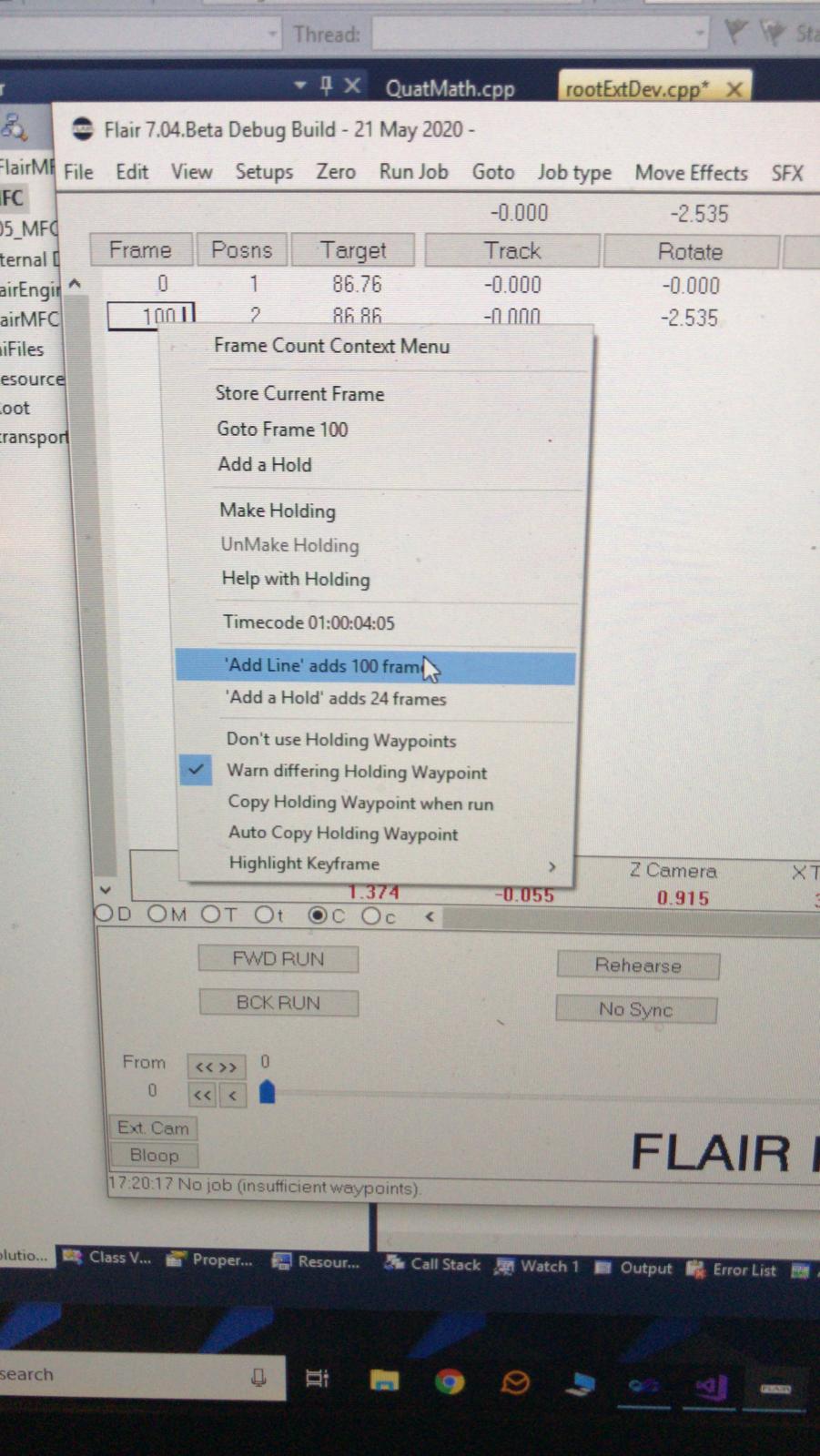
Media Text / Description
- Media 1: 2020-05-23 10:21 - ~ Simon Wakley
WhatsApp Excerpts
- 2020-05-23 10:05 - Tom D: Got a question regarding adding lots lines in flair - the default is 100 frames. Is there a place where we can change that default to another number? Hopefully I’m missing something simple! Ie, I’ve needed to plot out 50 lines of robot positions for a music video - all with the same frame increment of 175 frames between them. I ended up scaling, stretching and doing all sorts of things to achieve this. But being able to change the default from 100 to 175 frames would have been super handy.
- 2020-05-23 10:11 - ~ Niko: Hi Tom. Are you talking about the increment of frames each time you add a new keyframe, isn't it?
- 2020-05-23 10:12 - ~ Niko: If so, in flair.ini change the value of "DefaultFrameInc"
- 2020-05-23 10:21 - ~ Simon Wakley:
- 2020-05-23 10:22 - ~ Simon Wakley: Or switch to incremental frame mode and type 175 in each line
Related Tutorials
- Tutorial: Flair 7 Quick Tips: Customising the Main Window
- Tutorial: Flair 7 Quick Tips: Hand-held Box Configuration
- Tutorial: 13. Browsing and GoTo