Axis Reports Tripped Under Load — Model / Payload Pressure
Summary
An apparently random "axis reporting as tripped" fault can be caused by the robot pushing too hard against a model, fixture, or payload. The same thread also checked HHB/bypass, E-stop state, network connections, hub power, InTime, and robot power supply changes.
Symptoms
- Robot disengages due to an axis reporting as tripped.
- Error appears randomly, including after saving a job.
- Restart may clear it for some operators but not all.
- Fault may occur during model moving or when the robot is pushing against external resistance.
Community Solutions
[LIKELY] Remove external pressure / refine the rig being pushed
2024-08-30 — Chris
If the robot is pushing or carrying an external model/fixture:
- Stop and make the model/fixture safe.
- Check for binding, over-constraint, or excessive resistance.
- Refine the rig so the robot is not fighting the model.
- Re-engage only once the axis can move freely.
One field report said the error disappeared after reducing the pressure on the axes while model moving.
confidence_score: 0.72
[LIKELY] Check safety and network basics before escalating
2024-08-30 — Gordon Eschke / Navid Tansaz
Also check:
- HHB plugged in vs bypass dongle.
- Universal E-stop key orientation.
- Bypass E-stop button.
- Hub powered and network cables seated.
- InTime running.
- Recent power-supply changes to the robot.
confidence_score: 0.7
Related Media
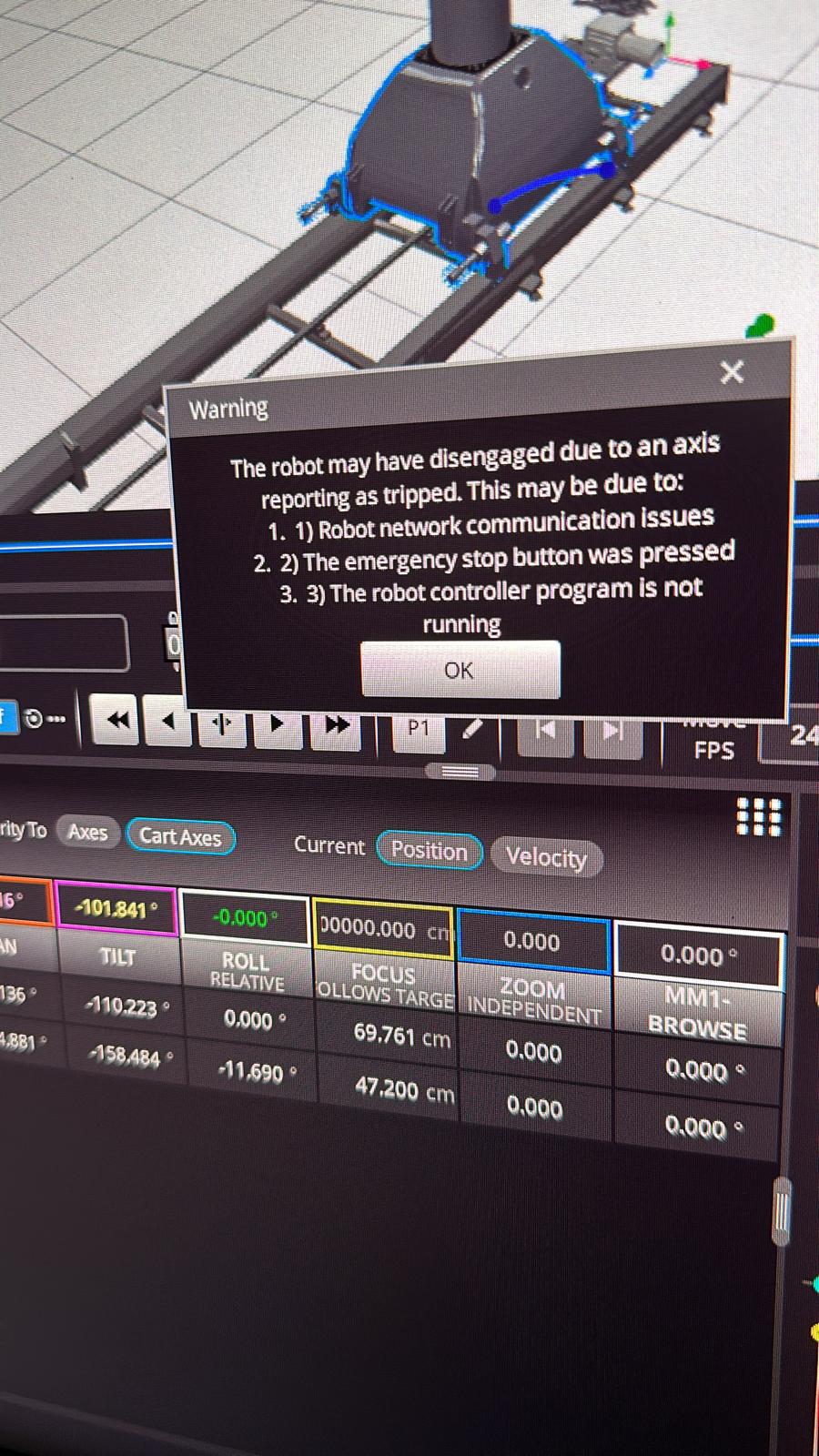
Media Text / Description
- Visible popup text: Warning - The robot may have disengaged due to an axis reporting as tripped. This may be due to: 1. Robot network communication issues. 2. The emergency stop button was pressed. 3. The robot controller program is not running.
- Image description: Flair Carts/axis display with Bolt/model-moving setup behind the warning popup; reported during external load or payload pressure troubleshooting.
- Media 1: Visible popup text: Warning - The robot may have disengaged due to an axis reporting as tripped. This may be due to: 1. Robot network communication issues. 2. The emergency stop button was pressed. 3. The robot controller program is not running. Image description: Flair Carts/axis display with Bolt/model-moving setup behind the warning popup; reported during external load or payload pressure troubleshooting.
- Media 2: Video of the same axis-tripped warning and model-moving/load context. Source file: 00026525-VIDEO-2024-08-30-23-49-38.mp4.
WhatsApp Excerpts
[30/8/2024, 11:40:17 pm] ~ Dax: Anyone getting an error
[30/8/2024, 11:43:00 pm] ~ Navid Tansaz: Yes we had this error a few times later with BOLT.. it happened quite randomly.. for example just right after saving the job !
[30/8/2024, 11:43:24 pm] ~ Navid Tansaz: I restarted everything and it was then fine
[30/8/2024, 11:43:42 pm] ~ Navid Tansaz: Later = lately
[30/8/2024, 11:44:08 pm] ~ Dax: Thanks Navid- just tried the restart and same error.
[30/8/2024, 11:49:38 pm] ~ Dax:
[30/8/2024, 11:51:52 pm] Gordon Eschke: Do you have the HHB plugged in? or the bypass dongle?
[30/8/2024, 11:56:44 pm] Gordon Eschke: Has anything changed on your power supply to the robot?
[30/8/2024, 11:57:07 pm] ~ Chris: We had this error yesterday when model moving with the bolt. It was because the axis were under too much pressure, when we refined the rig the bolt was pushing it went away
[30/8/2024, 11:59:14 pm] ~ Dax: HHB is plugged in
[31/8/2024, 12:01:36 am] Gordon Eschke: Can you check your network connections like cables, hub is powered etc? Is intime running?
[31/8/2024, 12:05:05 am] ~ Ryan Kroboth: Hub is powered and intime is running.
[31/8/2024, 12:05:40 am] ~ Ryan Kroboth: I tried unplugging the hbb and bypassing it, same issue
[31/8/2024, 12:05:47 am] Gordon Eschke: Ok
Related Issues
- See also: E-Stop / Work-Cell / Key-Switch Chain Warning
- See also: InTime Not Starting or Robot Not Found After Boot
- See also: Track Axis Trips 1–2 Seconds After Engagement