Flair DMX Over Ethernet - Enttec ODE, Showtec Net-2, USB vs Ethernet
Summary
Flair 7 DMX control expects an Ethernet DMX / Art-Net style device on the correct IP range. Several operators confused older USB DMX workflows with current Ethernet DMX workflows. The repeated field pattern is: use a real Ethernet DMX node, configure IP / Art-Net / UDP port 6454, connect the node to the InTime / Root network for Root DMX, and run the actual move rather than relying on the unimplemented DMX preview button.
Symptoms
- DMX device and lighting console do not see a signal from Flair.
- DMX test buttons do not affect the light.
- Operator has an Enttec USB controller but Flair expects an Ethernet DMX device.
- Flair External Devices shows DMX with IP/port fields, not a USB-only device list.
- Device IP is not on the intended robot/InTime subnet.
- Operator asks whether the Enttec DMX device connects to the InTime controlled hub or Windows network port.
- Operator asks whether
Root DMX,UDP, IP address, and port number are required. preview the DMX movebutton does not seem to do anything.run dmx movebutton does not do much.- Light responds to settings adjustments, but does not play when the move runs.
- Operator has a passive RJ45-to-DMX adapter rather than a real Art-Net / Ethernet DMX node.
Settings Location
| Task | Flair location |
|---|---|
| Enable/configure DMX from External Devices | Setups -> External Devices -> DMX / Root DMX |
| Configure DMX channels and values | Setups -> DMX |
| Test trigger-style outputs, not DMX channels | Setups -> Outputs -> Test Outputs |
| Device IP setup | Device vendor web UI or utility, then connect to the correct Flair/InTime network |
| Art-Net / UDP port | 6454 |
| Reported universe | Universe 1 when running a move |
Community Solutions
[CONFIRMED] Use An Ethernet DMX Device For Flair 7
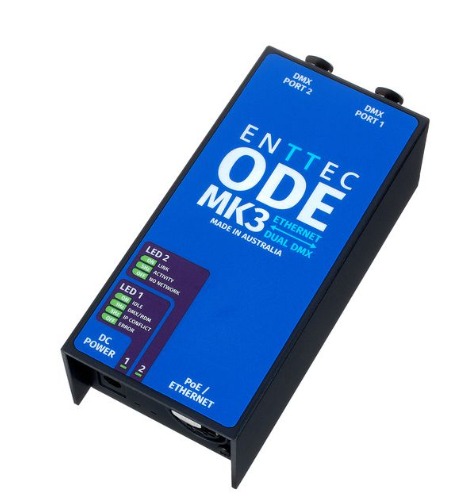
Use an Ethernet DMX interface such as Enttec ODE MK3 or Showtec Net-2/3 Pocket, not a cheap USB-only Enttec controller, for current Flair 7 Ethernet DMX workflows.
Confidence: 0.86
See also: Flair 7 DMX - USB Controller Disabled, Ethernet Art-Net Required
[CONFIRMED] Put The DMX Interface On The Correct IP Range
Set the DMX interface IP to the subnet Flair is using for external devices. The recent example used 192.168.1.30; older notes mention setting an Enttec ODE to a static 192.168.1.xxx address.
Confidence: 0.82
See also: Enttec ODE / Art-Net DMX - IP, Gateway, Universe, Port 6454
[LIKELY] Configure Over Windows, Then Run On The InTime / Robot Network
For Enttec-style devices, use the vendor configuration utility or web interface from a Windows-managed network port, set the IP, then connect the unit to the network path Flair uses for DMX. Operators specifically mentioned Enttec NMU for configuration.
Confidence: 0.72
[CONFIRMED] Do Not Rely On Preview DMX Move
The preview DMX move button was reported as not implemented. If channel sliders work but programmed DMX does not appear to play, test by running the move and confirm Art-Net is being sent on the Root / InTime network.
Confidence: 0.82
See also: Flair DMX Preview Move Button Not Implemented - Run Move Required
[LIKELY] Use A Real DMX Node, Not A Passive RJ45-DMX Adapter
Passive RJ45-to-DMX adapters only repin a cable. They cannot be used through a network switch and do not communicate as Ethernet / Art-Net devices.
Confidence: 0.80
[LIKELY] Daisy-Chain DMX Lights Directly If They Have DMX In/Out
If lights have DMX input and output ports, a separate lighting console is not necessarily required for simple Flair-controlled channel changes. Connect the Ethernet-DMX node to the first light, then chain DMX through the remaining fixtures.
Confidence: 0.68
[EXPERIMENTAL] Use FreeD / External Software If Flair DMX Is Not Suitable
One operator solved a DMX integration by writing a FreeD-driven program that sends lighting commands based on camera position. Treat this as a custom workaround, not the normal Flair DMX path.
Confidence: 0.46
[FIELD GUIDANCE] Consider Triggering The Lighting Desk Instead
For lighting shows, multipass cue sequences, or console-led jobs, many operators prefer a switch closure / GPI trigger, Trigger Lighting Desk OSC command, or shared LTC timecode rather than direct Flair DMX channel programming.
Confidence: 0.78
See also: Trigger Lighting Desk - GPI, OSC, Timecode, and DMX Cue Options
Evidence
| Timestamp | User | Evidence |
|---|---|---|
| 2021-04-13 | Joel / Niko / Simon | Trigger Lighting Desk OSC, DMX frame-accuracy caveats, and Art-Net / network-to-DMX discussed. |
| 2021-10-19 | Ben / Gordon Eschke | USB DMX issue; check DMX enabled in flair.ini, no other software such as Dragonframe fighting for the controller, and 8-bit channel limits. |
| 2022-03-01 | Gordon / Alexandre / Brick | Flair 7 no longer supports USB DMX; passive RJ45-to-DMX adapters are not network devices; a DMX node is required. |
| 2022-11-21 | Gordon / Valentin | USB DMX is not frame accurate; Showtec Net-2 works fine and is more affordable. |
| 2023-01-04 | Gordon / Valentin | Enttec ODE MK3 and Showtec Net-2/3 Pocket discussed as working Ethernet DMX options. |
| 2023-01-11 | Justin Mahood / Gordon Eschke | Enttec on 192.168.1.xxx, Root DMX, UDP, IP address, and default port 6454. |
| 2023-04-23 | Der Mo / Simon Wakley | ODE MK2 worked on laptop but not Flair; connect it to the same Root / RT12 / axis-board switch. |
| 2023-07-21 | Al / Simon Wakley | ODE MK3 IP/gateway troubleshooting; InTime is not the gateway and there is no router. |
| 2023-07-31 | Al / Gordon Eschke | preview DMX move not implemented; run the move. |
| 2024-07-25 | Hunter Herrick / Simon Wakley | Enttec ODE MK3 requires correct IP and communication on the InTime network; configure with Enttec NMU. |
| 2024-07-25 | Jo Paloma | Flair sends DMX over Art-Net on universe 1 when running a move; preview DMX did not work for them. |
| 2026-04-16 | Francisco Aguila / Timothy Heys Cerchio | ODE MK3 can connect directly to DMX lights in series if lights have DMX in/out ports. |
| 2026-05-18 | Rapha / MRMC Support | USB Enttec confusion; support linked DMX control in Flair - USB vs Ethernet; final conclusion was the USB-only controller was wrong and Ethernet was needed. |
Related Media
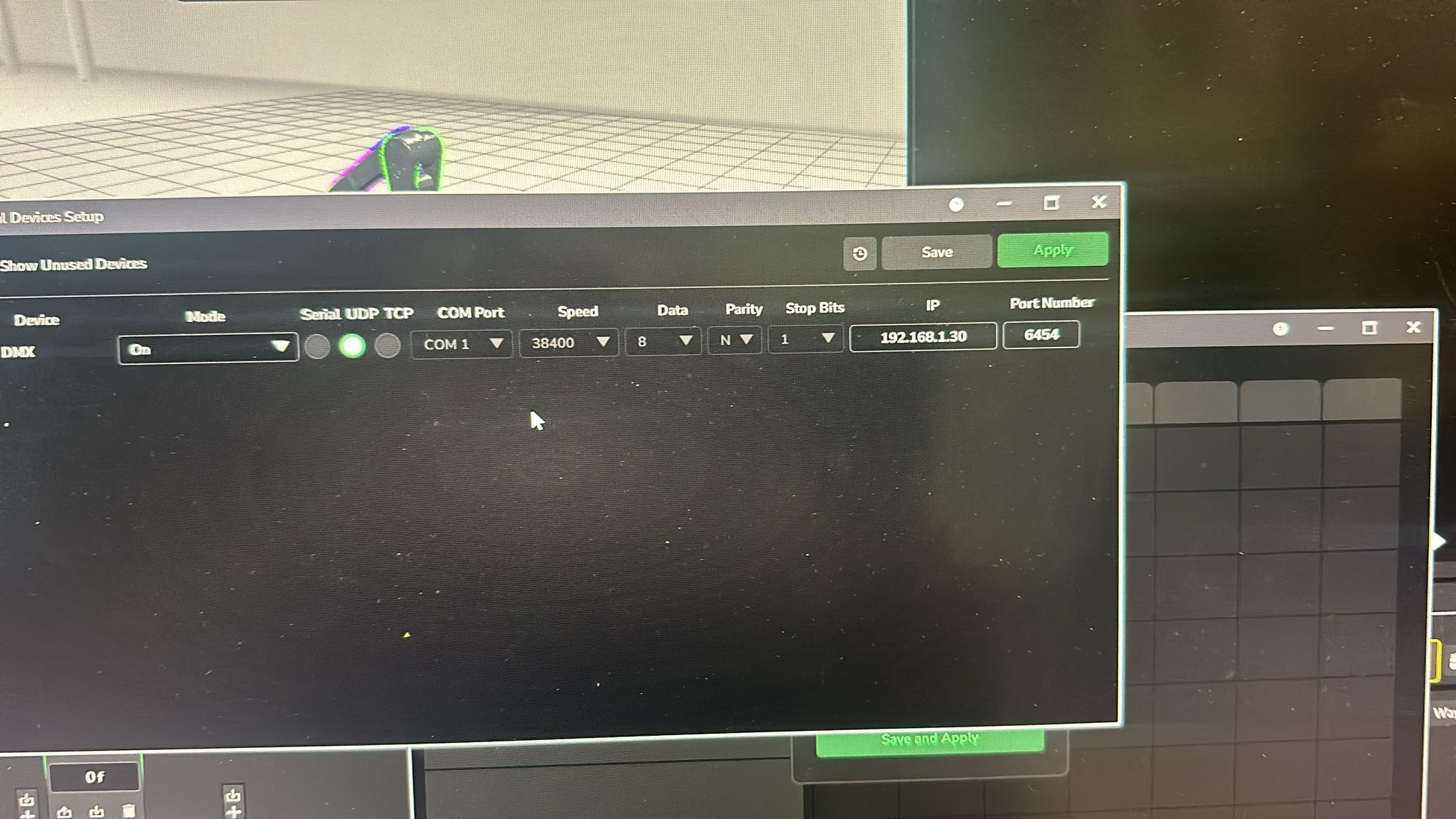
- Media 1: Visible UI text: External Devices Setup, DMX, UDP, IP 192.168.1.30, Port Number 6454, Save, Apply.
- Media 2: Image description: Enttec ODE MK3 Ethernet dual DMX interface, shown as the type of device expected rather than a USB-only controller.
Media Text / Description
- Visible UI text: External Devices Setup, DMX, UDP, IP 192.168.1.30, Port Number 6454, Save, Apply.
- Image description: Flair 7 External Devices Setup window showing DMX enabled with Ethernet/UDP-style configuration; operator had bought a USB-only Enttec controller and learned the current workflow needs an Ethernet DMX device.
- Image description: Enttec ODE MK3 Ethernet dual DMX interface, shown as an example of the expected Ethernet DMX type.
WhatsApp Excerpts
[18/5/2026, 11:52:28 pm] ~ Rapha:
[19/5/2026, 12:05:11 am] ~ Rapha: Mmm looks like I got the wrong enttec device.. usb connected.
[19/5/2026, 12:17:34 am] ~ MRMC Support: should look like this, but there are also other brands on the market
[19/5/2026, 12:18:11 am] ~ Rapha: Got it I just bought a cheapest usb only controler
[19/5/2026, 12:18:32 am] ~ MRMC Support: ah yes needs to be ethernet
[19/5/2026, 12:19:08 am] ~ Rapha: Just see that usb has been disabled some time ago.
[19/5/2026, 12:54:06 am] ~ Rapha: Thanks Gordon - will get the Showtec Net 2/3 pocket instead.
Official Documentation References
Related Issues
- See also: Flair Crashes Saving From DMX Popup — Missing DMX Drivers
- See also: Flair 7 DMX - USB Controller Disabled, Ethernet Art-Net Required
- See also: Enttec ODE / Art-Net DMX - IP, Gateway, Universe, Port 6454
- See also: Flair DMX Preview Move Button Not Implemented - Run Move Required
- See also: Trigger Lighting Desk - GPI, OSC, Timecode, and DMX Cue Options
- See also: Dragonframe Cannot Connect Over InTime Network — Requires Secondary NIC
- See also: FreeD / OSC Data to Unreal Engine, Aximmetry, or Disguise — Setup and Pitfalls
- See also: XLR Trigger Box For Lights - Relay Switching, Current Limits, and DMX Alternative