QuadBox Node Blue / Not Required - Stepper Axis Not Assigned
Summary
If a QuadBox or stepper node loads but its traffic light stays blue, Flair may be seeing the node but not using it for any configured axis. In the April 2026 thread, MRMC Support stated that Not required means the node is not assigned to an axis. The checks are: correct .btl, no duplicate IP, correct node/channel/port in Axis Setup, and restart or power-cycle Flair / QuadBox after changing network setup.
Symptoms / Questions
- Loading Node 3 says it has loaded, but the traffic light stays blue.
- Message appears:
Node 3 has been reloaded Please home all the axes. - Network Setup shows Node 3 as
Not Required. - Stepper motor or turntable via QuadBox does not move.
- Operator says
loading Node 3 after connecting everything doesn't turn on the green light (stays blue). - Operator says
It says it's loaded but the traffic light stays blue. - Find All detects hardware, but the motor does not move.
- The motor is plugged in and has resistance, but the axis still does not become active.
Settings Location
| Task | Flair location |
|---|---|
| Check node state / IP address | Setups -> Network Setup |
| Ping / Find All / Load node | Setups -> Network Setup |
| Assign node to an axis | Setups -> Axis Setup |
| Confirm stepper channel / port | Setups -> Axis Setup for the external axis |
Confirm .btl file |
Flair setup/network files and MRMC support-provided .btl |
Community Solutions
[CONFIRMED] Assign The Node To A Flair Axis
Not Required means Flair recognises the node but no configured axis currently requires it. Plain search phrase: Not required means it is not assigned to an axis. Check the external axis setup and assign the correct node and channel/port.
Confidence: 0.86
[LIKELY] Check For Duplicate Or Wrong IP Address
In the February 2026 case, the first response was duplicate IP address. If the IP is uncertain, unplug other devices, ping the box, or use a scanner on a laptop configured to the 192.168.1.xxx subnet.
Confidence: 0.76
[CONFIRMED] Do Not Use .236 Ever
MRMC Support specifically warned: Don't use .236 ever. Use the reserved IP guidance and avoid conflicts with RT, Node 1, Node 2, UltiBox, QuadBox, and other accessories.
Confidence: 0.82
[LIKELY] Confirm The Correct .btl
MRMC Support advised making sure the correct .btl is loaded. A node can appear present while still not being usable by the intended axis if the wrong board file or setup file is loaded.
Confidence: 0.72
[LIKELY] Restart Flair Or Power-Cycle The QuadBox
After network or axis setup changes, restart Flair and/or power-cycle the QuadBox. Dan Gottesman noted this can help after confirming node/channel/port assignment.
Confidence: 0.66
Evidence
| Timestamp | User | Evidence |
|---|---|---|
| 2026-02-28 | Sebastian Opitz | Loading Node 3 for turntable/stepper via QuadBox did not turn the green light on; it stayed blue and neither motor moved. |
| 2026-02-28 | Stafford | Suggested duplicate IP, pinging, unplugging other devices, laptop on 192.168.1.2, and IP scanner. |
| 2026-02-28 | MRMC Support | Linked reserved IP address guidance. |
| 2026-04-15 | Sebastian Opitz | Node 3 for stepper motor says loaded but traffic light stays blue. |
| 2026-04-15 | Chavez.Camera | Noted the node is loaded/connected but not required; likely not a networking problem. |
| 2026-04-15 | MRMC Support | Make sure you have the right btl; Don't use .236 ever; Not required means it's not assigned to an axis. |
| 2026-04-15 | Timothy Heys Cerchio / Dan Gottesman | Blue light usually means no axis set for that node; double-check Axis Setup node/channel/port and power-cycle Flair/QuadBox. |
Related Media
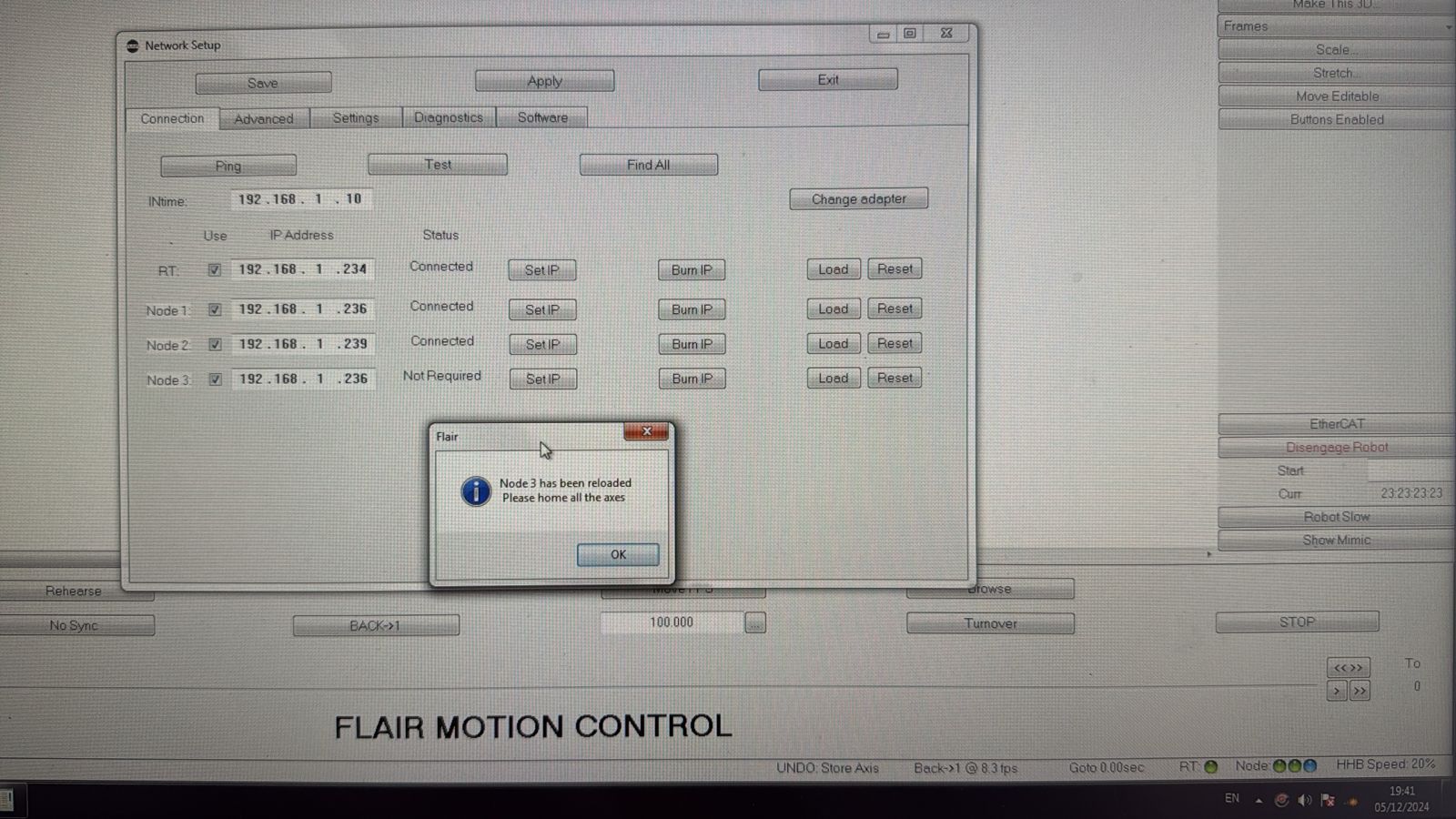
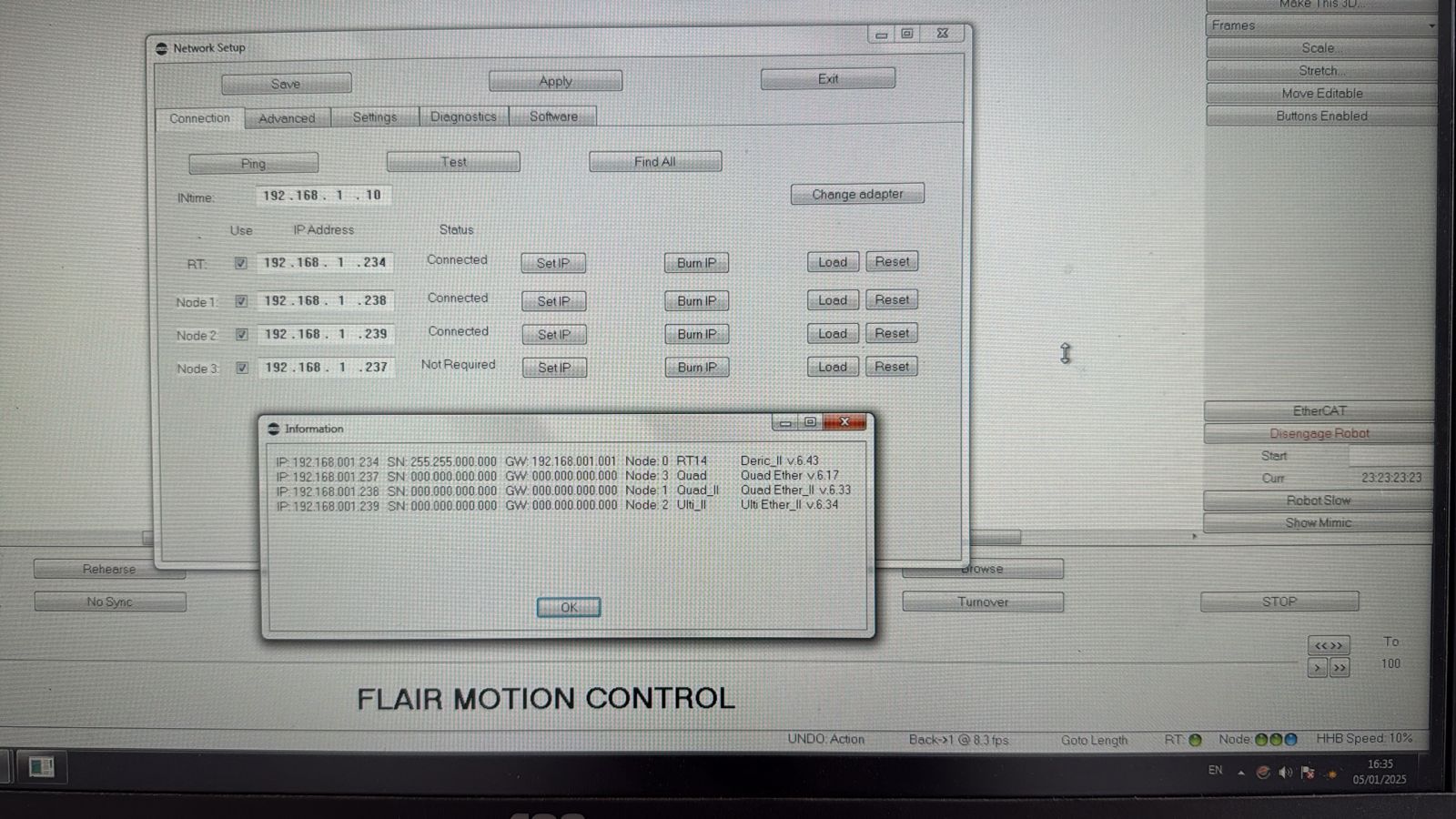
- Media 1: Visible UI text: Network Setup, Ping, Test, Find All, InTime
192.168.1.10, RT192.168.1.234Connected, Node 1192.168.1.236Connected, Node 2192.168.1.239Connected, Node 3192.168.1.236Not Required,Node 3 has been reloaded Please home all the axes. - Media 2: Visible UI text: Network Setup, RT
192.168.1.234Connected, Node 1192.168.1.238Connected, Node 2192.168.1.239Connected, Node 3192.168.1.237Not Required, information window listsNode 3 Quad,Node 1 Quad II,Node 2 Ulti II.
Media Text / Description
- Visible UI text: Node 3 has been reloaded Please home all the axes.
- Visible UI text: Node 3 Not Required.
- Visible UI text: IP 192.168.001.237, Node: 3, Quad, Quad Ether v6.17.
- Image description: Flair Network Setup sees the QuadBox node, but the node is blue / Not Required because it is not assigned to an axis.
WhatsApp Excerpts
- 2026-02-28 00:20 - Sebastian Opitz: Trying to use my turntable and the stepper motor via quadbox for the first time in quite a while, but loading Node 3 after connecting everything doesn't turn on the green light (stays blue).
- 2026-02-28 00:24 - Stafford: Duplicate ip address...
- 2026-02-28 00:28 - Stafford: If that doesn't work you can put the quad on any laptop, change the laptop network to 192.168.1.2 or something like that and use angry ip scanner.
- 2026-04-15 21:26 - Sebastian Opitz: Set up the Bolt after quite a while and dealing with this issue again trying to load Node 3 (for stepper motor). It says it's loaded but the traffic light stays blue.
- 2026-04-15 21:42 - MRMC Support: Make sure you have the right btl.
- 2026-04-15 21:42 - MRMC Support: Don't use .236 ever.
- 2026-04-15 21:48 - Timothy Heys Cerchio: usually the light stays blue when there is no Axis set for that particular Node.
- 2026-04-15 22:09 - MRMC Support: "Not required" means it's not assigned to an axis.