Gamepad / HHB Setup — XCam, Browse, Proportional Triggers, and Undo Caveats
Summary
Flair 7 supports USB controller assignment through Hand-held Box setup. Community operators repeatedly recommend Logitech-style gamepads with proportional triggers because they can be assigned to XCam/Browse and give smooth variable-speed movement. Use secure wired connections and be cautious with controller drift or version-specific bugs.
Symptoms / Questions
- Controller is seen by Flair but does not move robot
- Joystick feedback appears non-zero
- Robot drifts after assigning a gamepad
- Operator wants smooth browse control away from the desk
- Operator asks whether mimic can be controlled using a gamepad
Stable ID
ISSUE-CTRL-001
First Reported
2021-11-25 — gamepad setting migration discussions.
Additional Reports
- 2021-12-04 — Flair 7 RC1 gamepad drift warning.
- 2023-06-26 — controller support and Logitech preference.
- 2026-01-10 — gamepad assignment for XCam/Browse.
- 2026-04-10 — gamepad mimic control question remains unresolved.
Software Environment
Primarily Flair 7. Flair Classic may use different HHB setup terminology.
Installation Context
Flair 7 only or dual-install systems after settings migration. Re-check mappings after version changes.
Hardware
- MRMC HHB
- Logitech F310 / Logitech gamepads
- Xbox-style controllers
- USB cable
Community Solutions
[CONFIRMED] 2023-06-26 — User: Simon Wakley
Xbox-style controllers are supported, but Logitech gamepads were recommended because the front triggers are proportional and useful as XCam/Browse axes. Secure the cable so it cannot unplug mid-operation.
confidence_score: 0.86
[CONFIRMED] 2026-01-10 — Users: Pascal Rossow, Dan Gottesman, Niko
Assign gamepad axes in Setups -> Hand-held Box / HHB Setup. In carts control the assigned axis can drive XCam; in browse mode it can browse the move. Proportional triggers behave like accelerators: deeper press means faster motion.
confidence_score: 0.82
[FIRMWARE_SPECIFIC] 2021-12-04 — User: Remi
Flair 7 RC1 reportedly caused drift with a gamepad although raw joystick data looked correct. Rolling back to beta 88 fixed the same gamepad. Treat gamepad behavior as version-specific if drift appears after an upgrade.
confidence_score: 0.70
[EXPERIMENTAL] 2026-04-10 — User: Niko
Whether mimic movement can be controlled using a gamepad was asked, but no confirmed answer was found in the extracted context.
confidence_score: 0.35
Related Media
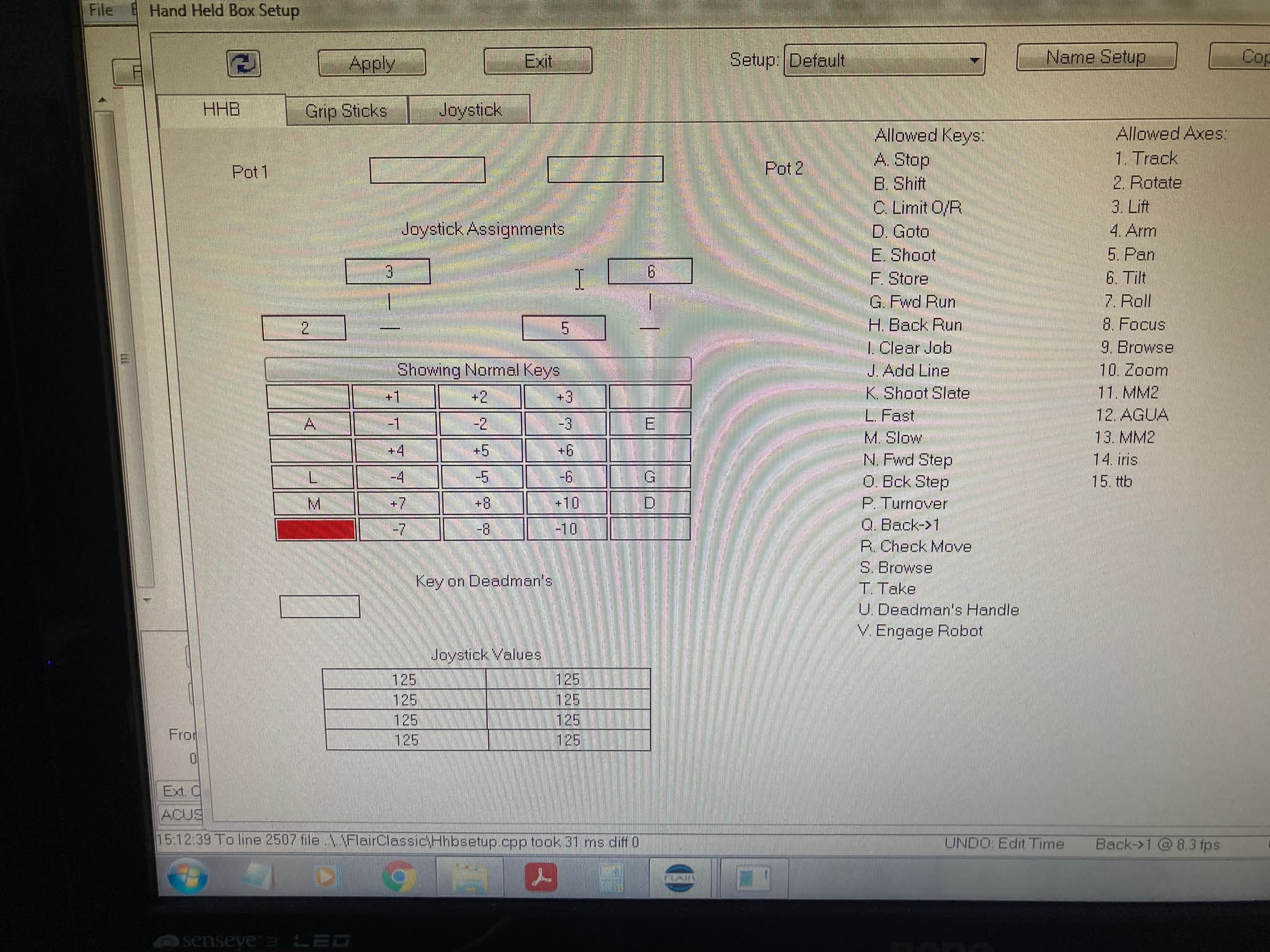
Media Text / Description
- Media 1: 2021-11-25 01:13 - ~ Carlos: Yes it’s working but the direction of the joystick it’s change
- Media 2: 2021-11-25 01:13 - ~ Carlos
WhatsApp Excerpts
- 2021-11-25 00:48 - ~ Dan Gottesman: hmm. must be a software issue, then. maybe try setting up a new HHB profile?
- 2021-11-25 00:49 - ~ Dan Gottesman: i had some issues when migrating my gamepad settings over from 6.47 to 7.17
- 2021-11-25 01:13 - Gordon Eschke: Great 👍
- 2021-11-25 01:13 - ~ Carlos: Yes it’s working but the direction of the joystick it’s change
- 2021-11-25 01:13 - ~ Carlos:
Related Tutorials
- Tutorial: Flair 7 Quick Tips: Hand-held Box Configuration — HHB / USB controller setup; save/apply behavior around 02:08.
- Tutorial: Flair 7 Quick Tips: Keyboard Shortcuts
- Tutorial: 13. Browsing and GoTo
Official Documentation References
Related Issues
- See also: PS4 DualShock 4 Gamepad Setup in Flair
- See also: Recommended Gamepads for Flair Robot Control - Logitech F310 and Alternatives
- See also: Gamepad / Joystick Drift - Robot Moves Uncommanded, Deadband Fix
- See also: Gamepad Not Detected - Driver Conflicts and HID Setup
- See also: Wireless Controller Driver Runaway Risk
- See also: Xbox Controller for Carts / Live Broadcast Operation
- See also: Live Tracker - Recording Robot Moves via the Flair 7 Mimic Window