Flair 7.5 Upgrade Startup Error — Fresh Install Still Fails
Summary
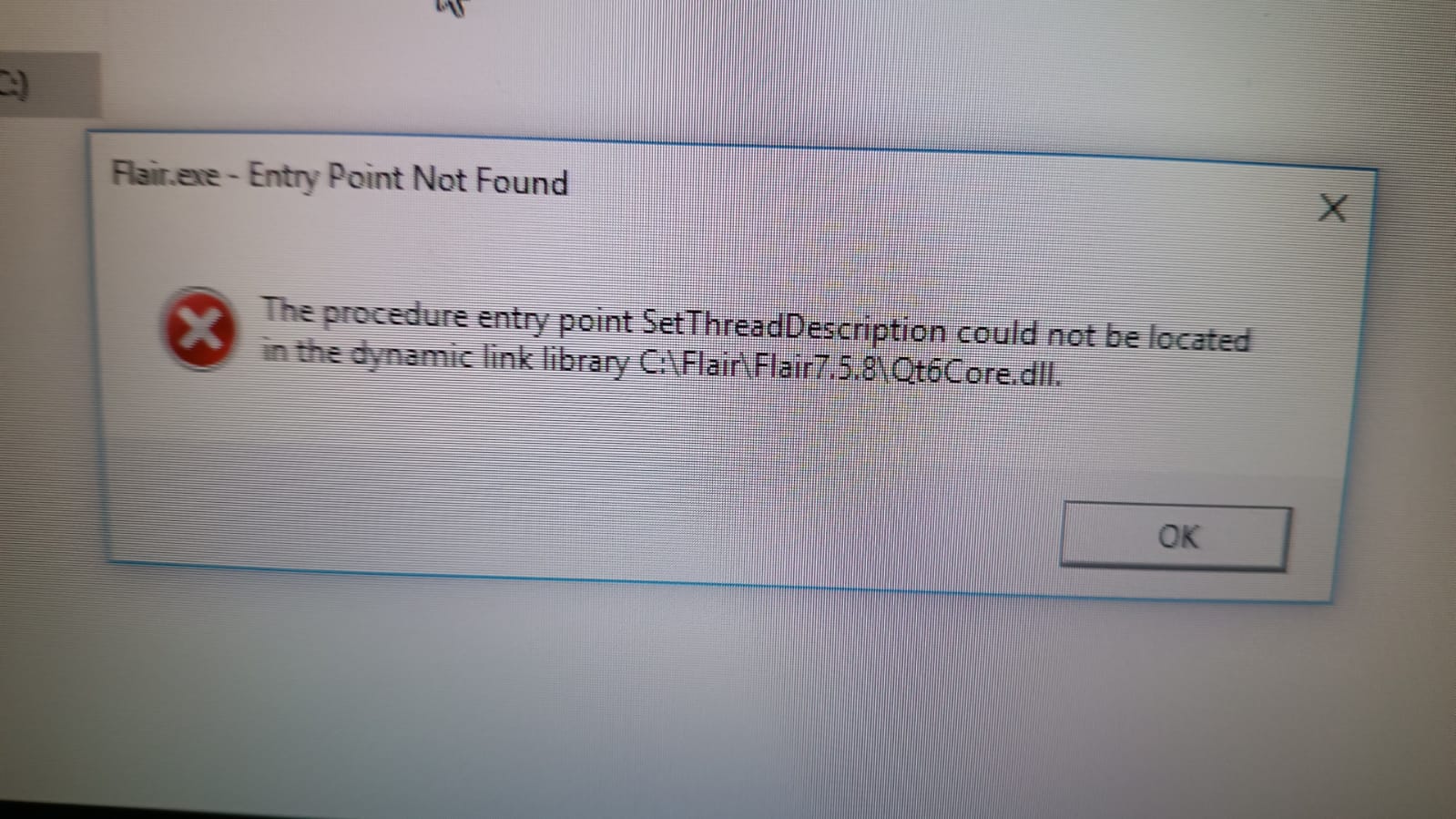
After upgrading to Flair 7.5.x, a startup error may appear even though Flair Classic and the last 7.4 build still open. The community suspected a failed upgrade / migration process first, but the reporter reproduced the error after fresh installs of 7.5.8 and 7.5.7, making this an escalation item rather than a confirmed field fix.
Symptoms
- Error appears immediately after upgrading to Flair 7.5.8.
- Flair Classic opens.
- Last 7.4 build opens.
- Fresh installs of 7.5.8 and 7.5.7 show the same error.
- User may be upgrading from an older Flair 7 installation.
Community Guidance
[LIKELY] Try a clean install and import settings
2025-02-04 — Marc Srour / Gordon Eschke
- Backup existing Flair settings and jobs.
- Perform a complete fresh install of Flair 7.5.x.
- Import settings rather than relying on the in-place migration.
- If 7.5.8 fails, test the previous 7.5 build.
confidence_score: 0.62
[NEEDS_ESCALATION] If fresh installs fail, stay on known-good 7.4 and send report
2025-02-05 — Marc Srour
Because fresh installs of both 7.5.8 and 7.5.7 produced the same error while 7.4 still worked, preserve the known-good 7.4 environment and escalate with the screenshot, installer versions, and upgrade history.
confidence_score: 0.62
Related Media
Media Text / Description
- Image description: Flair 7.5.x startup error screenshot after upgrade/fresh install while Flair Classic and the last 7.4 build still open normally.
- Media 1: Image description: Flair 7.5.x startup error screenshot after upgrade/fresh install while Flair Classic and the last 7.4 build still open normally. Searchable terms: Flair 7.5.8 startup error; Flair 7.5.7 startup error; fresh install still fails; Classic works; 7.4 build opens.
WhatsApp Excerpts
[4/2/2025, 9:06:44 pm] ~ Marc Srour: Just upgraded to flair 7.5.8, first upgrade to 7.5. Got this error, any ideas?
[4/2/2025, 9:07:23 pm] ~ Marc Srour: Opening flair classic works
[4/2/2025, 10:08:28 pm] Gordon Eschke: Could be that something went wrong during the upgrade process. Did you upgrade from a relatively old F7? Try a complete fresh install and them import settings.
[5/2/2025, 9:28:18 am] ~ Chavez.Camera: Flipping my base mount and things are not behaving as expected. I’m getting away with it for this shot but there must be something wrong here.…
[5/2/2025, 9:30:02 am] ~ Chavez.Camera:
[5/2/2025, 9:38:36 am] ~ Chavez.Camera: I think ideally I would have liked to 180 the base but that’s not an option. And my track cables aren’t actually long enough to reach left mount.
[5/2/2025, 10:38:15 am] ~ Riley Morgan: Did you just select right base mount without actually 180°ing the robot on its base?
[5/2/2025, 10:53:08 am] ~ Chavez.Camera: I rotated the base, the robot matches the rig model.
I did notice the x axis on track inverted when I switched base mount. I don’t think that was supposed to happen? At least that’s not what I anticipated.
[5/2/2025, 10:57:23 am] ~ Chavez.Camera: Base mount normal had x pointed in the opposite direction.
[5/2/2025, 12:20:19 pm] ~ Simon Wakley: I don't see what the issue is? How is the X inverted?
[5/2/2025, 12:27:29 pm] ~ Chavez.Camera: The positive direction of X was pointed the other way before I rotated the base.
Also my rig model does not match my robot. When track moves in one direction the rig model actually moves in the opposite direction.
[5/2/2025, 12:28:30 pm] ~ Chavez.Camera: @~Simon Wakley see here the robot and rig model are moving in opposite directions.
[5/2/2025, 1:20:23 pm] ~ Chavez.Camera: Could be Operator error.…
[5/2/2025, 1:23:58 pm] ~ Riley Morgan: Just reverse the track axis too..? 🤷🏻♂️
[5/2/2025, 1:34:08 pm] ~ Chavez.Camera: Everybody’s happy, moving on! 🙌🏼
I think I know where I went wrong.
Curious why base mount can only rotate right or left and not 180 from normal?
[5/2/2025, 1:57:20 pm] ~ Bucky: ~ Bucky joined using a group link.
Related Issues
- See also: Network Direct INI File Corrupt / Wrong Path After Upgrade
- See also: Windows Smart App Control Blocks Flair 7 After Update
- See also: Windows 11 and Flair 7.5 Require InTime 6.4+ / InTime 7