ARRI Alexa Mini — Requires EXT-RS Adapter for MRMC Sync Cable
Summary
The MRMC Ulti-Arri sync cable for the ARRI Alexa Mini does not plug directly into the camera. It requires an intermediate ARRI EXT-RS adapter (part number K2.0006170) between the MRMC cable and the camera body. Without this adapter, sync will not function. Additionally, the External Camera setting in Flair must be set to Pulsed (not "One Pulse"), and the camera requires 24V power for reliable sync operation.
Symptoms
- ARRI Alexa Mini sync does not work despite correct cabling
- Sync cable appears to connect but camera does not lock to robot
- Intermittent or unreliable sync behaviour
Hardware Required
| Component | Part Number | Notes |
|---|---|---|
| MRMC Ulti-Arri sync cable | MRMC part | Standard ARRI sync cable from MRMC |
| ARRI EXT-RS adapter | K2.0006170 | Required intermediate adapter; mounts to camera body |
Two adapter versions exist
ARRI makes multiple versions of the EXT-RS adapter. Not all are compatible with the MRMC Ulti-Arri cable. Confirm you have K2.0006170 specifically. An incompatible adapter version will result in no sync even with correct cabling.
Setup
1. Physical Connection
The EXT-RS adapter fits into the camera body's accessory socket. The MRMC Ulti-Arri cable connects to the EXT-RS adapter.
2. Flair External Camera Setting
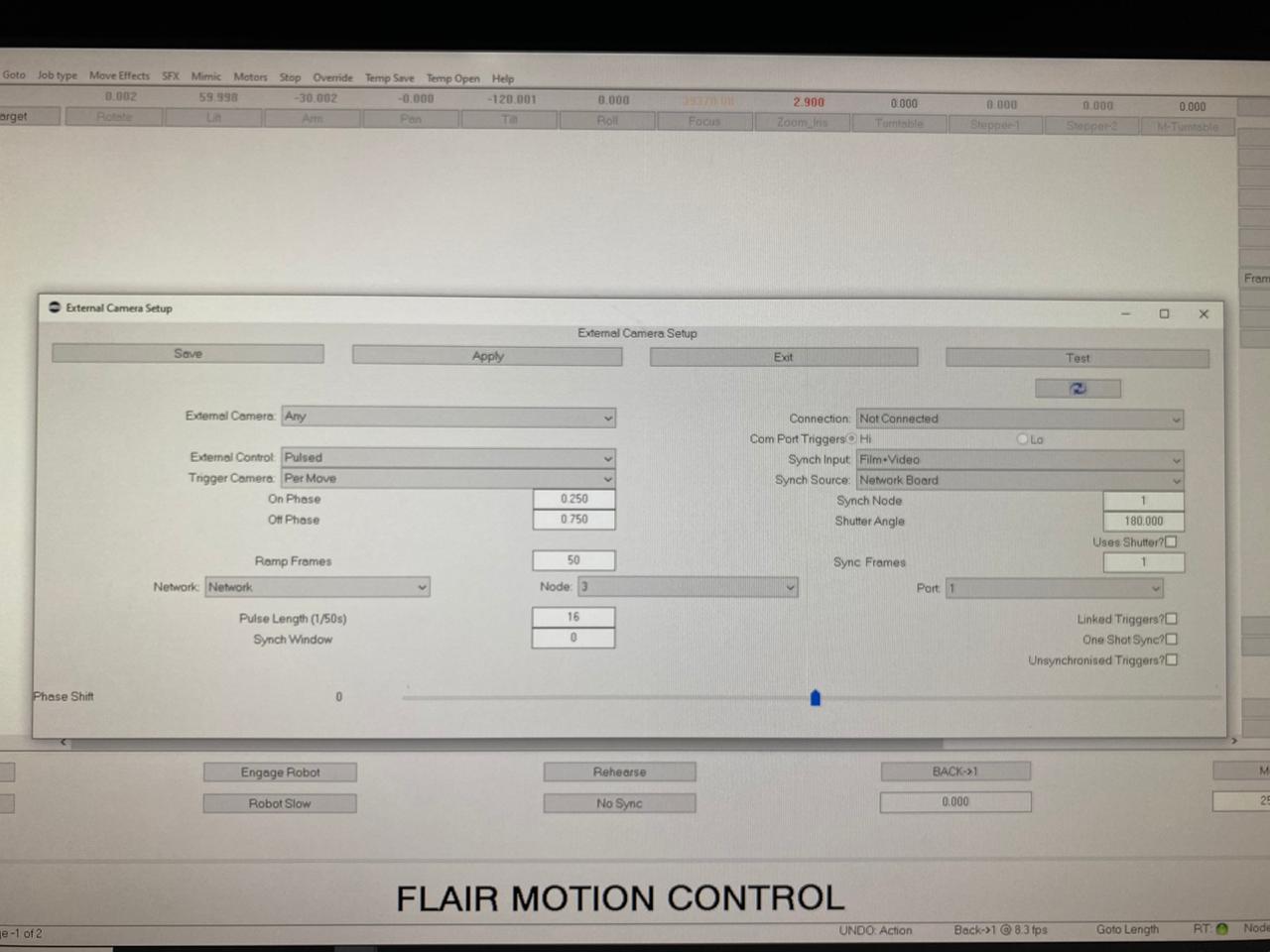
Open Setups -> External Camera Setup in Flair:
| Setting | Correct Value |
|---|---|
| Connection | Pulsed |
| ~~One Pulse~~ | ❌ Do not use |
Pulsed ≠ One Pulse
These are different settings in Flair. "One Pulse" is used for cameras like Phantom. The Alexa Mini requires Pulsed mode. Using One Pulse will result in sync failures or the camera not recognising the trigger signal.
3. Power
The ARRI Alexa Mini requires 24V power for reliable sync operation through the EXT-RS adapter. Running on battery power alone may result in intermittent or failed sync.
- Ensure the camera is powered from a 24V source (V-lock + step-up, or on-set power)
- If sync is intermittent, check camera power supply voltage before troubleshooting cables
Related Media
Media Text / Description
- Media 1: 2020-10-07 16:08 - Tran Quang Duy shared the ARRI Mini external camera settings screenshot and said it worked well, with camera frame rate matching Flair.
WhatsApp Excerpts
- 2020-10-07 11:32 - Dan Gottesman asked which sync/pulse settings to use with the ARRI Alexa Mini, noting that Phantoms and REDs use different sync/pulse settings.
- 2020-10-07 16:08 - Tran Quang Duy shared the ARRI Mini external camera settings screenshot
00001780-PHOTO-2020-10-07-16-09-04.jpgand said it worked well, with camera frame rate matching Flair. - 2020-10-07 18:55 - Niko confirmed the same configuration.
- 2020-10-09 22:17 - Dan reported that the job worked, but they needed an
EXT-RSadapter to connect the Ulti cable to the camera. - 2020-10-09 22:25 - Gordon Eschke linked ARRI part
K2.0006170and said it is needed for Alexa Mini to interface with the sync cable MRMC provides. - 2020-10-09 22:32 - Niko warned that there are two very similar versions of the adapter and not all attempts worked reliably.
References
- ARRI EXT-RS adapter documentation
- MRMC Ulti-Arri cable datasheet
- Flair Operator Manual — External Camera Setup (Flair Classic — Ch.5 Setups: External Camera Setup — p.90 · Flair 7 — Ch.5 Setups: External Camera Setup — p.52)