FBX Export from Flair — Paid License Required, ini Setup, and Export Button Greyed Out
Summary
FBX export from Flair is a paid add-on license — it does not appear in the CGI Export tab until licensed, and the export button will be greyed out (unclickable) even after licensing if certain preconditions are not met. After purchasing the FBX license from MRMC, apply it via Help → License, then add *FilmBox: True to flair.ini. The FBX export button will only become active when: (1) FBX is licensed, (2) the system is idle (not running a move), (3) Roll is in "Roll Up" mode (for 3-node export), (4) curve type is set to Bezier or Cubics, and (5) speed profiling is set to Cubic. Flair 6.43 is compatible with FBX 2012 format — select the correct format version when exporting.
Symptoms
- The FBX 1-node / 2-node / 3-node export options do not appear in the CGI Export tab.
- FBX export button is visible but greyed out and not clickable.
- FBX export attempt produces error code
-16230. - FBX options become available after a new license is applied but export still fails.
- Operator is on an older Flair 6.40.x and has recently purchased an FBX license.
Community Guidance
[RESOLVED] FBX Is a Paid Add-On License — Not Included by Default
2021-03-05 — Hugo Nilsson / Simon Wakley / Oscar Molano
The FBX export feature requires a separate purchase from MRMC. The standard ASCII export is included in the base Flair license; FBX is not.
After purchasing:
1. Apply the license via Help → License (enter the new license key).
2. The 1-node / 2-node / 3-node FBX export options will appear in the CGI Export tab.
3. Add *FilmBox: True to flair.ini (without this, export may fail even after licensing).
4. Check write permissions on the export destination folder.
Simon Wakley: "The standard ascii export is included. The FBX required considerable development and is a paid extra." Oscar Molano: "Is it really a paid feature? Never thought it was." [Confirmed yes.]
confidence_score: 0.97
[RESOLVED] Error -16230 After FBX License Applied — Upgrade Flair to 6.43.15
2021-04-09 — Gordon Eschke / Radu Stefan Fulga
Error -16230 on FBX export typically indicates either:
- flair.ini is missing the *FilmBox: True line, or
- Flair version is outdated and incompatible with the FBX library
Gordon Eschke's fix:
1. Check Help → License to confirm FBX is actually licensed (options appear in the CGI tab).
2. Add *FilmBox: True to flair.ini.
3. Upgrade Flair to 6.43.15 or newer (the operator was on 6.40.5 which has FBX compatibility issues).
4. Select FBX 2012 format when exporting (Flair 6.43 is compatible with 2012, not newer FBX versions).
Gordon Eschke: "Also flair.ini needs *FilmBox: True" Gordon Eschke: "Flair v6.43 is compatible with FBX 2012 so when exporting in fbx format make sure you select the correct version."
confidence_score: 0.97
[RESOLVED] FBX Export Button Greyed Out — Checklist
2023-01-30 — Gordon Eschke / Felix Roth
The FBX export button will not become clickable unless all of the following conditions are met simultaneously:
| Condition | Check |
|---|---|
| FBX is licensed | Help → License |
| System is idle (not running a move) | Stop any running move |
| Roll is in Roll Up mode | Required for 3-node export |
| Curve type is Bezier or Cubics | Not Linear |
| Speed profiling is Cubic | Check speed profile settings |
Gordon Eschke: "@~Felix Roth please check: 1. FBX Is licensed; 2. System is idle (not running a move); 3. Roll is in up (for 3 node export); 4. Curve type is Bezier or Cubics; 5. Speed profiling is Cubic" Felix Roth: "Thank you. Roll was the problem."
confidence_score: 0.97
[RESOLVED] FBX Import/Export Crashes — Fixed in Flair Classic 7.3 Beta 55
2022-12-14 — Gordon Eschke / Niko / Josh T.
Multiple operators reported Flair Classic 7.3 Beta 50 crashing on FBX import or export. The fix is Flair 7.3 Beta 55 or newer.
Gordon Eschke: "A number of you recently reported issues with FBX import/export. This has had some major work done by Simon and the team and if you install the latest v7.3 Beta55 (or the Classic version contained therein) then you should find the issues resolved."
Note: import of FBX models into the rig model view is still not supported in Classic even after Beta 55.
confidence_score: 0.95
Related Media
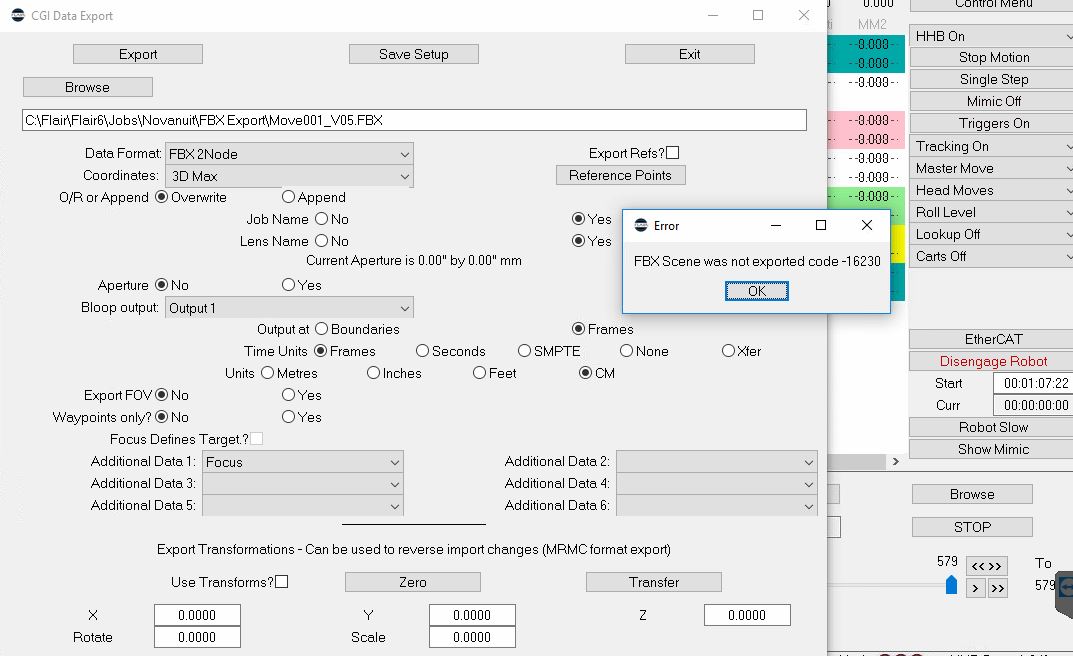
- Media 1: Flair CGI Export tab showing FBX export error code -16230 on Radu Stefan Fulga's system. The error was caused by a combination of a missing
*FilmBox: Trueline in flair.ini and an outdated Flair version (6.40.5). Upgrading to 6.43.15 and adding the ini line resolved the issue.
WhatsApp Excerpts
[5/3/2021] ~ Oscar Molano: Hi can someone give me a little help on exporting FBX files from flair. By watching Peter videos there is a option on export cgi tab that says FBX 1node, 2 or 3. He is using flair 6.40. I'm using flair 6.43 and that option is not on my machine.
[5/3/2021] ~ Hugo Nilsson: You need to buy the license from MrMc
[5/3/2021] ~ Oscar Molano: Is it really a paid feature? Never thought it was
[5/3/2021] ~ Simon Wakley: The standard ascii export is included. The FBX required considerable development and is a paid extra.

[9/4/2021] ~ Radu Stefan Fulga: Hello, we just got an FBX license for Flair. I get this error when I try to export. [photo: error -16230]
[9/4/2021] Gordon Eschke: Please check Help > license to make sure fbx is licensed
[9/4/2021] Gordon Eschke: Also flair.ini needs *FilmBox: True
[9/4/2021] ~ Radu Stefan Fulga: I've just added the license, after the license update, the FBX options in CGI export became available.
[9/4/2021] Gordon Eschke: Time for an upgrade! Please download v6.43.15 from the website and upgrade
[9/4/2021] Gordon Eschke: Backup your flair folder before upgrade
[9/4/2021] Gordon Eschke: Flair v6.43 is compatible with FBX 2012 so when exporting in fbx format make sure you select the correct version

[30/1/2023] ~ Felix Roth: We're trying to export our move with the latest beta. The export button is not clickable
[30/1/2023] Gordon Eschke: @~Felix Roth please check: 1. FBX Is licensed; 2. System is idle (not running a move); 3. Roll is in up (for 3 node export); 4. Curve type is Bezier or Cubics; 5. Speed profiling is Cubic
[30/1/2023] ~ Felix Roth: Thank you. Roll was the problem
Related Issues
- See also: FBX Licence and ini Setup (CGI Motion)
- See also: FBX Node Types — 1-Node, 2-Node, 3-Node
- See also: FBX Invalid Job — Roll Mode Mismatch
- See also: FBX Export Crashes Flair
- See also: FBX Export from Flair to Unreal - Z-Up Issue, 90 Degree Parent Actor, Reduce Keys
- See also: Flair Licensing Policy - Annual Re-registration and Upgrade Checks
- See also: CRITICAL: Always Select UPGRADE During Flair Install
Related Tutorials
▶ 01:17 — Help -> License confirms FBX is active; FilmBox: True in flair.ini