Simul8 Maya Import Error - CSV Header Row Count
Summary
An image-defined Simul8 2.1.0 / Maya 2024 import error after a filtered move was traced to a CSV/header row count issue. The field workaround was to change the shown value to the expected written value minus header rows.
Symptoms
- Simul8 / Maya import fails after filtering a move.
- Error references mismatch between expected and written values/rows.
- Header rows appear to be counted incorrectly.
Evidence
| Timestamp | User | Media | Evidence |
|---|---|---|---|
| 2025-01-26 19:52 | Heiko Matting | 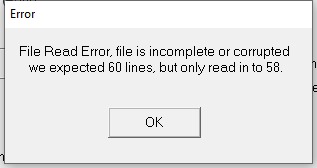 , , 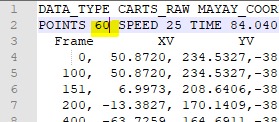 |
Image description: Simul8 2.1.0 / Maya 2024 import error after filtering a move; dialog shows a mismatch between expected and written values/rows, caused by CSV header-row counting. |
Related Media
Media Text / Description
- Media 1: 2025-01-26 19:52 - Heiko Matting: Image description: Simul8 2.1.0 / Maya 2024 import error after filtering a move; dialog shows a mismatch between expected and written values/rows, caused by CSV header-row counting.
- Media 2: 2025-01-26 19:52 - Heiko Matting: Image description: Simul8 2.1.0 / Maya 2024 import error after filtering a move; dialog shows a mismatch between expected and written values/rows, caused by CSV header-row counting.
WhatsApp Excerpts
Media Text / Description
- Screenshot/error description: Simul8 2.1.0 / Maya 2024 import error after filtering a move; dialog shows a mismatch between expected and written values/rows caused by CSV header-row counting.
[26/1/2025, 7:52:34 pm] ~ Heiko Matting: Quick Tip for simul8 2.1.0 Maya 2024 (didn´t try yet if it´s the same for Maya 2025). You might get this error when importing a filtered move (filter set by click on cam/aim in Maya add on to Rig Node) from Maya. Solution below.
[26/1/2025, 7:56:03 pm] ~ Heiko Matting: Change that value to the expected one. This is simply the written value minus header rows. Might be a little bug in the new simul8 version.
[26/1/2025, 7:56:17 pm] ~ Heiko Matting: Have a nice sunday.
[26/1/2025, 8:32:26 pm] ~ Peter Constan-Tatos: Yeah this works well when you use orbital to define a TT move. Julian, is there an easy way to do this for the reverse, i.e. when you want to do a 180 deg whip pan? If you’re close to 180 it will take the shortest path, even in PT target tracking.
[26/1/2025, 8:33:45 pm] ~ Peter Constan-Tatos: I had a shot just this week where we had the move perfect then DP moved one of the key frames and it started whipping the wrong way. Took a while to get it right with key frames but it’s difficult as you can’t browse it when it keeps following the wrong path.
[26/1/2025, 8:36:58 pm] ~ Julian Hermannsen: It's very new. It's a new auxiliary axis mode. If you have aux axes set up instead of using 'adjusted move' or adjusted target' use 'adjusted PTR'. So you're using a new layer of movement with pan tilt tracking on top of your TT or orbital move. XT is then Pan aux
[26/1/2025, 8:37:30 pm] ~ Julian Hermannsen: Especially useful in orbital because there's no way to do a fast pan otherwise...
[26/1/2025, 8:40:57 pm] ~ Peter Constan-Tatos: Great thanks will look at that Julian. Which version has this?
[26/1/2025, 8:45:22 pm] ~ Julian Hermannsen: Not sure which versions.
[26/1/2025, 9:58:40 pm] ~ Teodor Görtz: Hey guys! Just wondering what you would recomend using to record runs for quick playback to show clients? Also would be cool too get connected to a laptop to do a quick and dirty post stab on stuff that has some vibration. Did anyone have a good solution for this?
[26/1/2025, 10:01:40 pm] ~ Teodor Görtz: Using cinebot mini btw
[26/1/2025, 10:10:47 pm] ~ Ante: For playback I just show it from camera. For connecting laptop to camera video feed you would need something like blackmagic studio recorder, but I doubt it would be good for stabilization, for quick import on timeline is good.
Community Solution
[LIKELY] Adjust Expected Row Count For Header Rows
In the Simul8 import dialog / row-count prompt in Maya, change the shown value to the expected written value minus the CSV header rows. Treat this as a version-specific workaround for Simul8 2.1.0 / Maya 2024.
Confidence: 0.82
Related Issues
- See also: FBX Export — Licence, flair.ini Flag, and Transfer Speed Setup
- See also: FBX Export Crashes or Hangs Flair Classic
- See also: FBX Export — 1-Node vs 2-Node vs 3-Node Explained