Trigger Lighting Desk - GPI, OSC, Timecode, and DMX Cue Options
Summary
For lighting cues, direct DMX from Flair is not always the best workflow. The community repeatedly recommends choosing the trigger method based on the lighting system: GPI / switch closure into a lighting desk for robust start-cue behavior, Trigger Lighting Desk for an OSC command, shared LTC timecode for frame-aligned desk playback, or direct Ethernet DMX / Art-Net when Flair is directly driving fixture channels.
Symptoms / Questions
- Operator asks whether to use Flair DMX, Dragonframe, a lighting console, or another PC.
- Operator asks
do you send osc from "trigger lighting desk"? - Operator wants Flair to start a lighting desk cue or GrandMA cue.
- Operator wants a DMX desk to start at the same time as the robot.
- Operator wants multi-pass lighting repeatability and asks whether DMX is frame accurate.
- Operator has a physical remote input on the lighting desk and wants a simple start trigger.
Settings Location
| Task | Flair / device location |
|---|---|
| OSC-style lighting command | Trigger Lighting Desk command / dialog |
| Trigger output to desk GPI | Setups -> Outputs and trigger box output wiring |
| Timecode start workflow | Synchronisation / LTC input / Start TC |
| Direct fixture channel control | Setups -> DMX and External Devices -> DMX / Root DMX |
| Realtime data output to show-control software | Setups -> External Devices -> Data Output |
Community Solutions
[LIKELY] Use GPI / Switch Closure For A Robust Lighting Desk Start Cue
Several operators prefer a simple relay or switch closure into the lighting desk's remote / GPI input. This asks the lighting desk to run its own programmed cue sequence while Flair only supplies the start pulse.
Confidence: 0.80
[LIKELY] Use Trigger Lighting Desk For OSC To Show-Control Software
The Trigger Lighting Desk command can send an OSC command to a lighting console or show-control package. Reported tools include Vezer, QLab, MadMapper, and LightKey.
Confidence: 0.78
[CONFIRMED] Use Shared LTC Timecode When The Desk Must Follow Time
One reported workflow split an external LTC source to Flair and the DMX desk. Flair ran from LTC input with the correct start timecode, and the DMX desk read the same timecode.
Confidence: 0.76
[LIKELY] Direct Flair DMX Is Better For Simple Channel Values Than Whole Lighting Shows
Direct DMX can be useful for simple channel changes, but several operators reported better cue workflows by letting lighting software or a console handle the lighting sequence and using Flair only to trigger or sync it.
Confidence: 0.78
Evidence
| Timestamp | User | Evidence |
|---|---|---|
| 2021-04-13 | Joel / Niko / Simon | Trigger Lighting Desk can send OSC; direct DMX may not be very frame accurate; Art-Net in Classic 7.17 was described as more accurate network-to-DMX. |
| 2021-10-20 | Joel | Best results used Trigger Lighting Desk; sent /go to Vezer or QLab and passed cues to MadMapper. |
| 2021-10-21 | Simon | Listed lighting desk trigger options: relay/button press, OSC command, timecode, DMX trigger, or manual/bloop cue. |
| 2022-03-01 | Joel / Gordon | Trigger Lighting Desk sends an OSC command to a lighting control solution; lighting desk protocol is separate from DMX. |
| 2022-06-27 | Tom / Lennard | Split third-party timecode to Flair LTC input and the DMX desk; set start TC in Flair; desk reads same timecode. |
| 2022-11-21 | Radu | Trigger-box cable to a DMX console remote input triggered the next scene from a Flair output. |
| 2024-10-12 | Simon / Jeremy | Switch closure / GPI into the lighting desk was preferred as simpler and robust; GrandMA desks can use GPI input directly or through accessory hardware. |
| 2025-04-02 | Dan / Jeremy | For GrandMA2 triggering, output triggers were preferred over Trigger Lighting Desk by some operators. |
Related Media
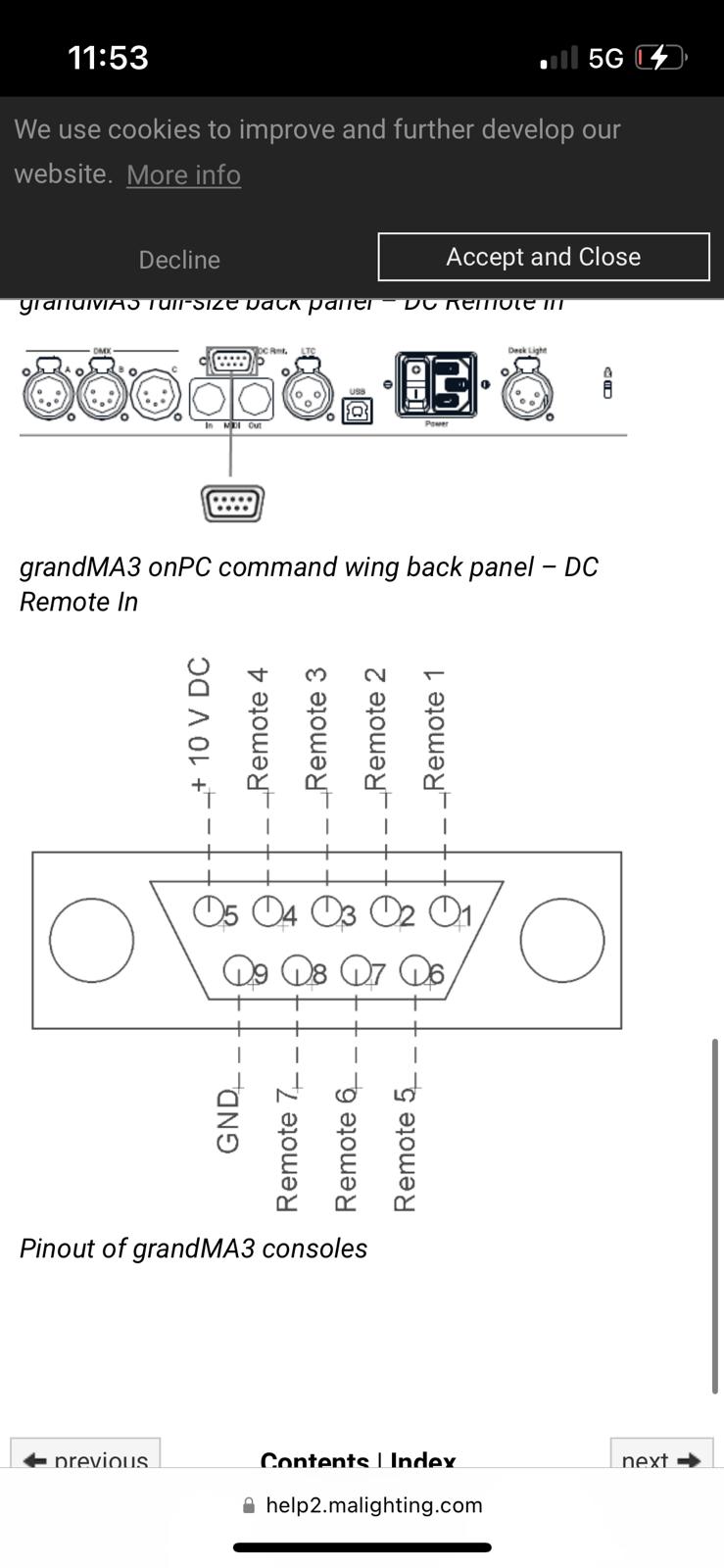
- Media 1: Visible UI text: grandMA3 full-size back panel - DC Remote In, grandMA3 onPC command wing back panel - DC Remote In, pinout of grandMA3 consoles, Remote 1, Remote 2, Remote 3, Remote 4, +10 V DC, GND.
Media Text / Description
- Visible UI text: grandMA3 full-size back panel - DC Remote In.
- Visible UI text: grandMA3 onPC command wing back panel - DC Remote In.
- Visible UI text: Pinout of grandMA3 consoles, +10 V DC, Remote 1, Remote 2, Remote 3, Remote 4, GND.
- Image description: Lighting desk remote input pinout used as evidence for wiring a trigger-box switch closure into a GrandMA / DMX console remote input.
WhatsApp Excerpts
- 2021-04-13 02:08 - joel.spezeski: There is a "Trigger Lighting Desk" Command that can send an OSC command to a start program on a lighting console or lighting software.
- 2021-04-13 02:18 - Niko: By default DMX is not very frame accurate.
- 2021-10-20 02:49 - joel.spezeski: The best results I have had use the trigger lighting desk command.
- 2021-10-20 02:49 - joel.spezeski: Mostly I send a /go command to Vezier or Qlab and pass cues to MadMapper or some other software.
- 2022-03-01 13:19 - joel.spezeski: Probably the easiest method is to use the "Trigger Lighting Desk" command from flair which sends an OSC command to the lighting control solution of your choice.
- 2022-11-21 20:21 - Radu Stefan Fulga: We trigger it with a simple cable in the trigger box that links to pin 1 (remote 1) and pin 9 (gnd).
- 2022-11-21 20:23 - Radu Stefan Fulga: Whenever you give it an output in Flair, it triggers next scene on the dmx console.
- 2024-10-12 08:28 - Simon Wakley: I personally don't use the lighting desk trigger since it is more complex to set up, I usually use a switch closure to the lighting desk.
- 2024-10-12 09:18 - Jeremy Andrews: it's simpler to send a 'start sequence' cue to a lighting desk that has a GPI (General Purpose Interface) input trigger.
Related Issues
- See also: XLR Trigger Box For Lights - Relay Switching, Current Limits, and DMX Alternative
- See also: Flair DMX Over Ethernet - Enttec ODE, Showtec Net-2, USB vs Ethernet
- See also: Flair 7 DMX - USB Controller Disabled, Ethernet Art-Net Required
- See also: Enttec ODE / Art-Net DMX - IP, Gateway, Universe, Port 6454
- See also: LTC Timecode Trigger Setup
Related Tutorials
- Tutorial: 10. Triggers Box and Bloop — trigger-box context when driving a desk via relay/GPI.
- Tutorial: Flair 7 Quick Tips: Output Triggers — output trigger timing and cue triggering.