Flair Disengages but Robot Stays Engaged — YRC / Base Network Path
Summary
When Flair shows an error and appears to disengage, but the physical robot remains engaged and the 3D model no longer matches the arm, suspect the robot-controller network path before chasing job data. In the resolved case, a full cold restart restored operation; the recommended investigation was the network cable / hub path from the Flair PC through the robot base and YRC/controller.
Symptoms
- Robot had been working earlier in the day.
- After a break, the robot engages physically but Flair errors.
- Flair appears disengaged while the physical robot remains engaged.
- The Flair 3D model is wrong while the real arm position is fine.
Community Solutions
[CONFIRMED] Cold restart the full system, not only the PC
2022-01-18 — Alex / Peter Constan-Tatos
- Stop work and place the robot in a safe state.
- Power down the whole robot/control system, not only Flair.
- Reboot the controller, allow it to complete boot, then start the Flair PC / Flair in the correct order.
The reporter confirmed that restarting only the computer and Bolt did not clear it; shutting down everything did.
confidence_score: 0.82
[LIKELY] Inspect the YRC / base network path
2022-01-18 — Peter Constan-Tatos
If the problem returns:
- Check the network cable from the hub through the robot.
- Try connecting direct to the Flair computer to bypass a suspect hub.
- Inspect the network connection inside the robot base.
- Treat this as controller communication rather than a pure move-programming fault.
confidence_score: 0.74
Related Media
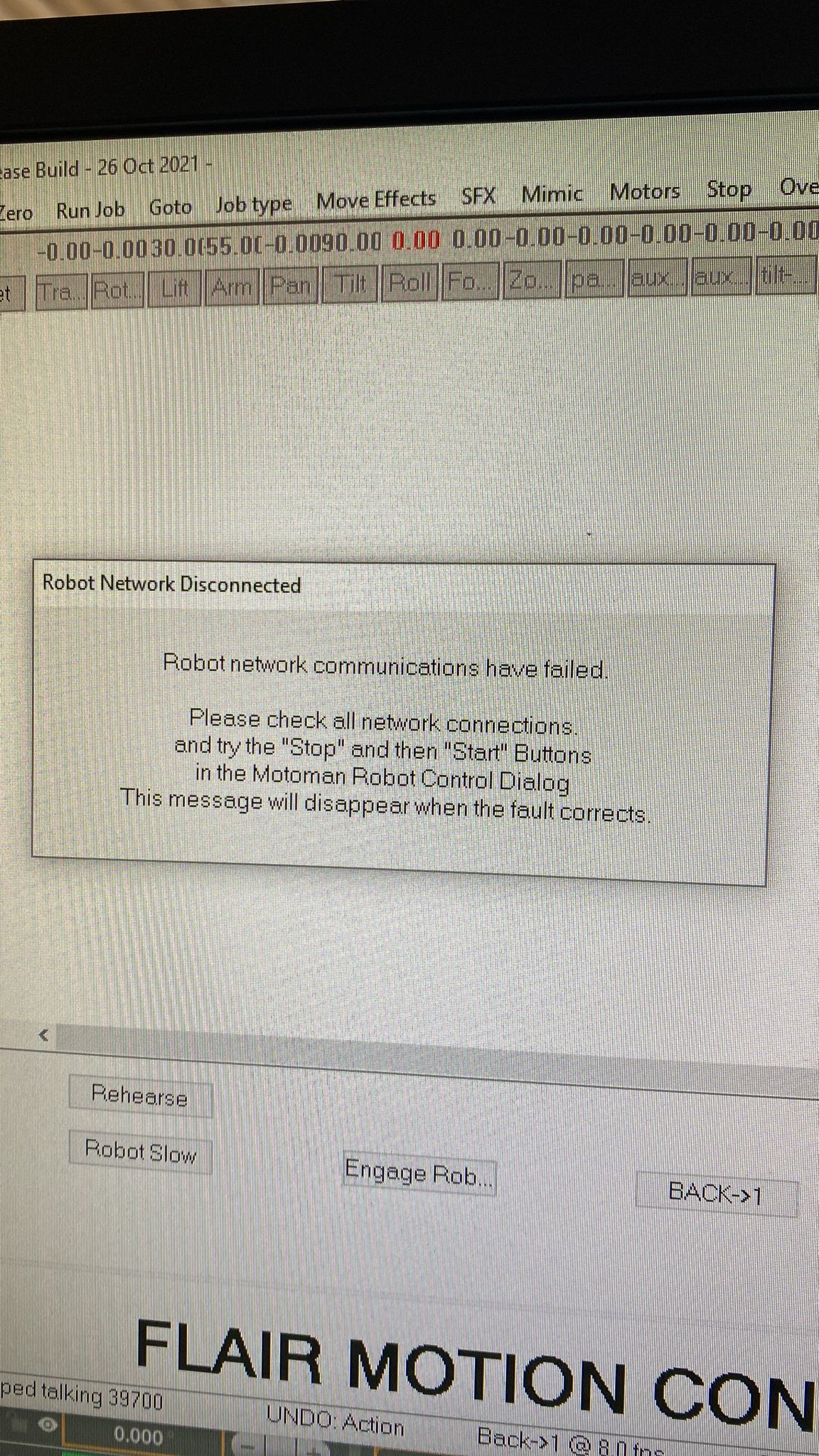
Media Text / Description
- Screenshot/error description: Flair reports an error or appears disengaged while the physical robot/controller stays engaged and the 3D model position no longer matches the real arm.
- Media 1: Screenshot/error description: Flair reports an error or appears disengaged while the physical robot/controller stays engaged and the 3D model position no longer matches the real arm.
WhatsApp Excerpts
[18/1/2022, 4:20:26 pm] ~ Alexandre Bartholo: Hi, there, Alex from Japan.
Any clue that this error is about ?
[18/1/2022, 4:21:14 pm] ~ Alexandre Bartholo: Robot was working fine, then went to lunch, came back, and the robot engage but I get that error and it disengage in flair but stays engaged on the robot…
[18/1/2022, 4:22:04 pm] ~ Alexandre Bartholo: Also for some reason the arm is showing that on the 3D model, but in reality it’s fine.
[18/1/2022, 4:22:25 pm] ~ Alexandre Bartholo:
[18/1/2022, 4:32:49 pm] ~ Peter Constan-Tatos: Hi Alex. You have the newer/track version with the YRC controller in the base? Then there’s only the network cable from the hub through to the robot that you first l need to check. Also the hub may be playing up, try connecting direct to the computer. The network connection inside the base is next to look if above is okay.
[18/1/2022, 4:33:44 pm] ~ Peter Constan-Tatos: But first do a cold restart of all systems.
[18/1/2022, 4:44:55 pm] ~ Alexandre Bartholo: I did a full restart and now it’s working
[18/1/2022, 4:45:08 pm] ~ Alexandre Bartholo: What a strange problem…
[18/1/2022, 4:45:46 pm] ~ Alexandre Bartholo: Restarting only the computer and the bolt did not work, but shutting down everything and then powering up again worked
[18/1/2022, 4:46:34 pm] ~ Alexandre Bartholo: The IT crowd would be proud
[18/1/2022, 4:55:53 pm] ~ Peter Constan-Tatos: 😅 yep always the first thing….it’s not the robot they’re solid, it’s all the other computer gunk we hang onto them 🤣
Related Issues
- See also: EtherCAT "Network Communications Not Running" — Systematic Troubleshooting
- See also: InTime Not Starting or Robot Not Found After Boot
- See also: EtherCAT Error / CS8 Shows 'E' — Flair Started Before CS8 Finished Booting