Part Runs From Timecode - CalcTC and Start TC Update
Summary
Operators asked whether part runs from timecode require more than pressing CalcTC and matching the timecode FPS to the move FPS. The community answer was that the workflow is straightforward once the base timecode input works: calculate the part run from the Part Run dialog, watch the Start TC box update, and verify the incoming LTC stream.
Symptoms
- Part run needs to start from a known music/playback timecode position.
- Operator is uncertain whether preroll, trigger, and camera offsets are recalculated for the part run.
- Start TC does not appear to match expected cue time.
Evidence
| Timestamp | User | Evidence |
|---|---|---|
| 2025-07-07 00:51 | Heiko Matting | Image description: Part Run / Start TC screenshot attached to CalcTC workflow question. For timecode part runs, calculate the part run via Run Part Run; newer versions may include a checkbox in the part-run dialog to update automatically. The Start TC box should update and preroll/trigger/external camera calculations are refreshed. Attached screenshot: 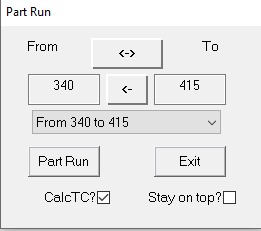 . . |
| 2025-07-07 01:23 | Timothy Heys Cerchio | CalcTC on part runs helps work out how much to pre-cue soundtrack. |
| 2026-03-06 07:48 | Riley Morgan | Asked whether CalcTC plus matching timecode FPS and move FPS is sufficient. |
| 2026-03-06 07:50 | Community reply | Every part-run calculation updates Start TC for that part run and its preroll; watch the Start TC box and verify the LTC stream. |
| 2026-03-08 13:45 | Simon Wakley | Insists VTR verifies part-run timecode because TC errors are not fixable after the take. |
Community Solutions
[CONFIRMED] Calculate The Part Run And Watch Start TC
Run the part-run calculation before shooting. In newer Flair versions, use the Part Run dialog checkbox if available; in older workflows, calculate the part run then apply/update Input Setup.
Expected result: Start TC changes to the timecode value required for that specific part run, including preroll.
Confidence: 0.86
[CONFIRMED] Match Move FPS And Timecode FPS
The source timecode FPS and the Flair move FPS must match. If they do not, the calculated cue can appear correct but drift or land on the wrong frame.
Confidence: 0.84
[LIKELY] Verify The LTC Stream Before Trusting The Calculation
The harder failure is usually getting clean incoming LTC rather than the part-run math itself. Community notes include watching for a damaged/noisy LTC stream from a laptop/boombox setup, especially when power/charging introduces noise.
Confidence: 0.78
[CONFIRMED] Have VTR / Playback Verify
On timecode-critical jobs, have VTR verify the cue and frame alignment. If timecode is wrong, the plate may be unusable.
Confidence: 0.9
Related Media
- Media 1: Image description: Part Run / Start TC screenshot for CalcTC and part-run preroll/timecode setup.
Media Text / Description
- Screenshot/UI description: Part Run dialog / Start TC area showing the timecode value after using CalcTC for a part run.
WhatsApp Excerpts
[7/7/2025, 12:51:06 am] ~ Heiko Matting: ...when shooting with TC and you switch to part runs after you applied the starting TC in Input Setup, you just have to calculate your part run by Run Part Run and, in former versions, just hit apply to the input setup after that. In newer versions, don´t know since when, you have a checkbox in the partrun dialog to let do the software that for you. You can see the Start TC box updating once you did that. Every time you do that, all the prerolls, all the changes you did to triggers or in external camera setup, get calculated freshly based on the given input setup and those changes. So, and this was one of the greatest wonders when I started with Flair, Part runs with TC do work with no further effort, as soon as you understood how to click through. The much more complicated thing is to get the TC input working properly :)), so I always plan to backup with triggering a prepared timeline on a different laptop to play the sound.
[7/7/2025, 1:23:53 am] Timothy Heys Cerchio: And, in the latter case, the CalcTC on part runs will be helpful to work out how much to pre-cue the soundtrack 😉
[7/7/2025, 12:19:52 pm] ~ Mocosplus: Hi Buds, how can i less preroll lenght, iam using input trigger
[7/7/2025, 1:14:46 pm] ~ Riley Morgan: Do you have any triggers on before frame 0? Should not pre roll much at all
[7/7/2025, 1:40:55 pm] ~ Mocosplus: No out put trigger set, but preroll seem not affect on input trigger,
[7/7/2025, 3:07:01 pm] Tom D: can you type in 0 frames over the top of the 64 frames?
[7/7/2025, 3:08:08 pm] Tom D: In Flair7, does anyone know please where I can adjust the render distance from camera so that I don’t see inside this FBX woman’s head?
[7/7/2025, 3:27:51 pm] Timothy Heys Cerchio: I remember seeing, in one of the most recent versions, an input box where you can set the angle of view on the camera perspective.
[7/7/2025, 3:28:24 pm] ~ Mocosplus: Can not Bro
Related Issues
- See also: LTC Timecode Trigger Setup — Move Won't Fire on TC
- See also: Part Runs and Preroll Extents — Hard Stops, Track Travel, and Safe Checking
- See also: HyperDeck with Flair — IP Setup, Record Control, and Version Pitfalls