Bolt X Not Connected / Turned On at Flair Startup
Summary
A startup warning on a Bolt X can simply mean Flair cannot see the Bolt X because the robot is not connected, not powered, or InTime has not finished starting. The community also flagged Windows updates and robot power supply faults as causes when the symptom persists.
Symptoms
- Error appears when Flair boots.
- Bolt X / robot is not found or cannot be enabled.
- The InTime taskbar icon may still be grey / not ready.
- Similar symptoms can appear after Windows updates or a failed robot PSU.
Community Solutions
[LIKELY] Confirm robot power and wait for InTime before opening Flair
2023-03-05 — Timothy Heys Cerchio / Simon Wakley
- Confirm the Bolt X is connected and powered.
- Let Windows complete startup.
- Wait for the InTime icon to become coloured.
- Confirm robot-side status lights are in the expected ready state.
- Only then open Flair.
The chat explanation was direct: "In general it means your Bolt X is not connected or turned on."
confidence_score: 0.8
[LIKELY] If repeated, check Windows update / InTime and robot PSU
2023-03-05 — Lennard / Simon Wakley
If the warning keeps returning:
- Check whether Windows updated recently.
- Verify InTime is installed, licensed, and running.
- Check the network hub/cables.
- If the robot has no lights or behaves as if dead, investigate PSU failure.
confidence_score: 0.7
Related Media
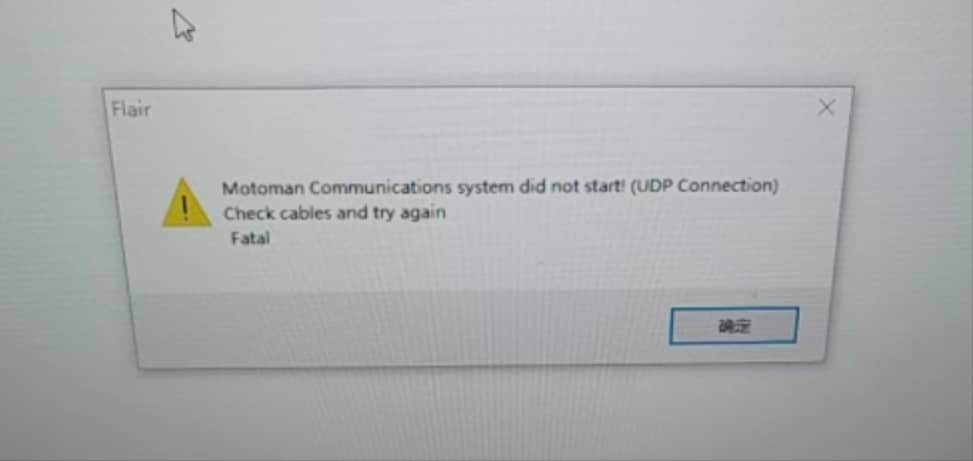
Media Text / Description
- Screenshot/error description: Flair startup warning means the Bolt X is not connected, not turned on, or InTime has not finished starting.
- Media 1: Screenshot/error description: Flair startup warning means the Bolt X is not connected, not turned on, or InTime has not finished starting.
WhatsApp Excerpts
[5/3/2023, 6:17:27 pm] ~ steven: Hi, guys. Does anybody know what does this error indicates?
[5/3/2023, 6:19:52 pm] ~ steven: It occurs when we booted up the flair software.
Related Issues
- See also: InTime Not Starting or Robot Not Found After Boot
- See also: Windows Updates Break InTime — Keep Flair PC Offline
- See also: EtherCAT "Network Communications Not Running" — Systematic Troubleshooting